

Grammarly
A writing assistant that works everywhere you already type.
- AI
- Productivity
- Marketing
- from $12/mo
Grammarly checks grammar, clarity, tone and style across browsers, desktop applications and mobile keyboards, with generative features for drafting and rewriting. Its distinguishing quality is not the checking itself but the distribution: it appears inside the tools people already write in, rather than asking them to write somewhere new.
Grammarly: the short answer
Every line below is drawn from facts verified on 9 August 2026.
- What it is
- A writing assistant that works everywhere you already type
- Best for
- Professionals writing email and documents all day
- Starts at
- Free plan available; Pro $12/month
- Free option
- Free plan available, 7 days on Pro trial
- Biggest strength
- Works inside almost every application people actually write in
- Biggest drawback
- Suggestions flatten distinctive writing towards corporate neutral
- Closest alternative
- ProWritingAid - Deeper stylistic analysis for long-form writing, with a lifetime licence option
- True annual cost
- from $144 a year at the cheapest paid tier
Grammarly at a glance
| Best for | Professionals writing email and documents all day, Non-native English speakers working in English, Teams wanting consistent tone across customer communication |
|---|---|
| Category | AI, Productivity, Marketing |
| Starting price | Free plan available; Pro $12/month |
| Free plan | Yes |
| Free trial | 7 days on Pro |
| Pricing model | freemium |
| Company | Superhuman, formerly Grammarly, Inc. |
| Founded | 2009 |
| Headquarters | San Francisco, California, United States |
| Founders | Max Lytvyn, Alex Shevchenko, Dmytro Lider |
| Platforms | Web, Windows, macOS, iOS, Android |
| Public API | Yes |
| Browser extension | Yes |
| Mobile apps | iOS + Android |
| Self-hosting | No |
| Affiliate programme | Affiliate programme advertised, paying per referred subscription |
| Data source | Vendor pricing page and public records |
| Last checked | August 2026 |
Grammarly pricing
Prices below were read from the vendor's own pricing page on 9 August 2026. Pricing model: freemium. Free trial: 7 days on Pro.
| Plan | Price | Billing | Notes |
|---|---|---|---|
| Free | $0 | per month | Grammar, spelling and basic clarity suggestions |
| Pro | $12 | per month | Full rewrites, tone adjustment, plagiarism detection and generative AI |
| Enterprise | Custom | Negotiated | Style guides, analytics, admin controls and security review |
What Grammarly actually costs over a year
A monthly price is not the same thing as a monthly contract. These are the plans above multiplied out to twelve months, per seat or unit where the plan is charged that way.
| Plan | Monthly | Over 12 months |
|---|---|---|
| Pro | $12 | $144 |
Which Grammarly plan should you buy?
| Your situation | Recommended | Why |
|---|---|---|
| You want basic grammar and spelling help | Free | Genuinely useful on its own, and the tier most individuals should start with. |
| You write professionally every day | Pro | $12 a month for rewrites, tone adjustment and generative features. |
| You need a shared style guide and admin controls | Enterprise | Quote only, and bought for consistency across a team rather than for individual writing help. |
| You already pay for an AI assistant | Check for overlap first | ChatGPT or Claude will rewrite and adjust tone too. Grammarly's advantage is that it works everywhere you type, not that it writes better. |
| You cannot send text to a third party | Do not use Grammarly | It works by processing your writing on their servers. No tier changes that. |
Verdict by who you are
Professional writing email all dayYes
It appears inside the tools you already use rather than asking you to write somewhere new, which is the whole reason it works.
Non-native English speakerYes
The clarity and phrasing suggestions are most valuable here, and Free already helps.
Team wanting consistent customer communicationCompare first
Enterprise style guides do this, but confirm the price is worth it against simply writing guidelines.
Experienced editor or authorNo
Suggestions become intrusive, and it has no real editorial judgement about structure or argument.
Organisation with strict data handling rulesNo
Your text is processed externally by design.
Should you buy Grammarly?
Buy Grammarly if…
- Professionals writing email and documents all day
- Non-native English speakers working in English
- Teams wanting consistent tone across customer communication
Do not buy Grammarly if…
- Writers who find suggestions intrusive
- Organisations that cannot send text to a third-party service
- Anyone needing deep long-form editorial judgement
Key features
- Grammar, spelling and punctuation checking
- Clarity and conciseness rewriting suggestions
- Tone detection and adjustment
- Generative drafting and reply composition
- Browser extension covering most web applications
- Desktop apps and a mobile keyboard
- Plagiarism detection on Pro
- Custom style guides and brand tones on Enterprise
Integrations
- Google Docs and Gmail
- Microsoft Word and Outlook
- Slack and LinkedIn
- Chrome, Edge, Safari and Firefox
- Grammarly for Developers SDK
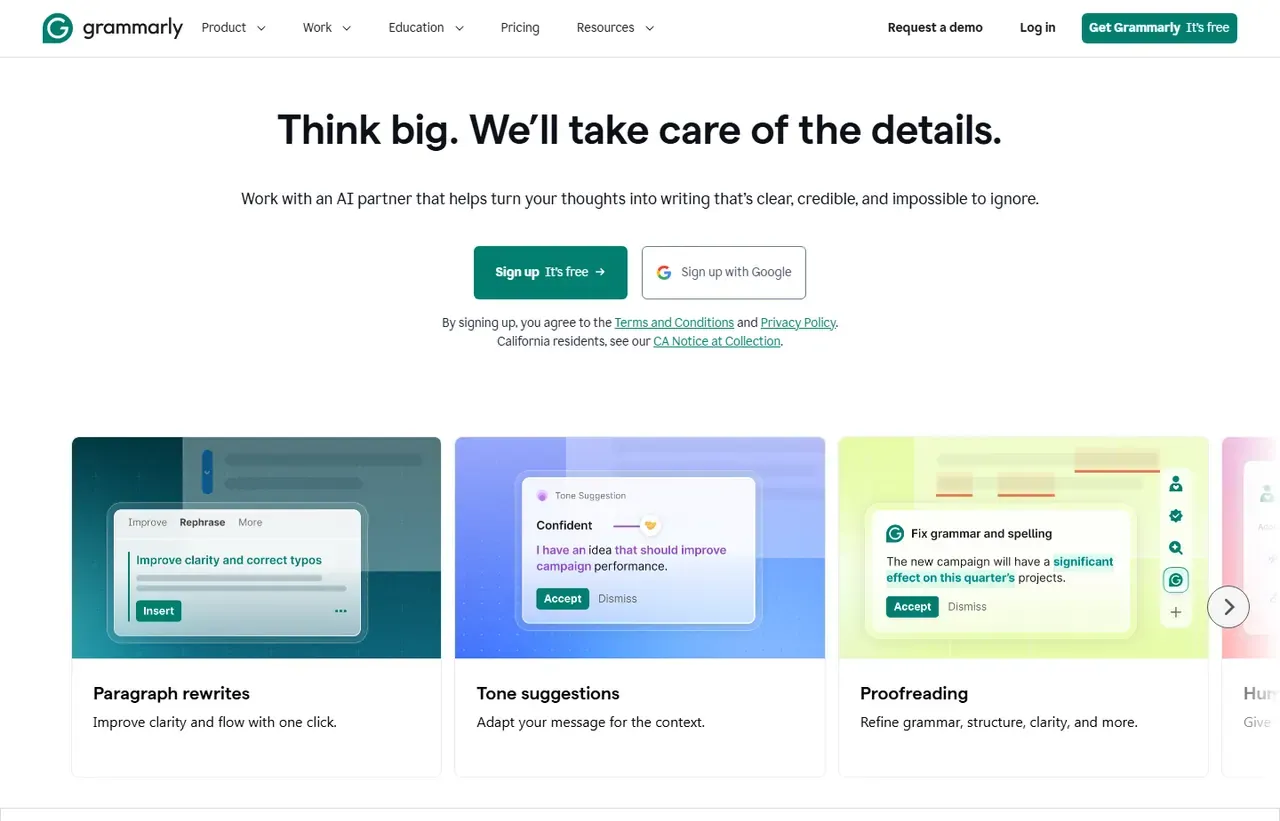
Grammarly screenshots
Captured by us in August 2026 at 1440px, unedited. Interfaces change, so these show the product as it looked on the date we verified this profile. Vendors localise pricing by visitor region, so a pricing screenshot may display a different currency to the USD figures recorded above.

Our assessment
Grammarly's value is proportional to how much you write and how much that writing matters. For someone producing customer emails, proposals and documentation all day, and particularly for people working in a second language, $12 a month is easily justified. The free tier is genuinely useful rather than a demonstration, which is unusual. Two caveats deserve weight: the suggestions push towards a flat, corporate register that experienced writers will fight, and the service processes your text on its own servers, which is a real question for legal, medical and regulated organisations regardless of the compliance page.
What works in Grammarly
- Works inside almost every application people actually write in
- Free tier is genuinely useful for everyday correctness
- Excellent for non-native speakers writing professionally
- Tone detection catches unintended abruptness in email
What doesn't
- Suggestions flatten distinctive writing towards corporate neutral
- Text is processed on Grammarly's servers, which some organisations cannot allow
- Generative features overlap with assistants many teams already pay for
- Browser extension adds noticeable weight in some applications
EveryAny Decision Score
Scored by dimension rather than averaged into one number, because the trade-offs are the useful part. 3 of these 8 dimensions are calculated from verified facts by published formula; the rest are editorial judgement, labelled as such. How each score is calculated.
- Cost position4/10
derivedentry tier at $12 a month against a category median of $12 across 5 comparable tools
- Portability5/10
derivedpublic API
- Subscription flexibility9/10
derivedfree plan, free trial, freemium, monthly billing
- Feature depth6/10
editorialeditorial judgement, reviewed at last check
- Ease of learning10/10
editorialeditorial judgement, reviewed at last check
- Collaboration6/10
editorialeditorial judgement, reviewed at last check
- AI capability7/10
editorialeditorial judgement, reviewed at last check
- Professional adoption9/10
editorialeditorial judgement, reviewed at last check
What leaving Grammarly would cost
moderate lock-in
Calculated as 10 minus a portability score of 5, built from four signals (self-hosting, a public API, open-source licensing and a documented export path) . Grammarly scores on: public API. Formula.
Grammarly competitors and alternatives
| Alternative | Why you might pick it instead |
|---|---|
| ProWritingAid | Deeper stylistic analysis for long-form writing, with a lifetime licence option. |
| LanguageTool | Open source, cheaper, and self-hostable for privacy-sensitive teams. |
| ChatGPT or Claude | More capable at rewriting, without the everywhere-you-type integration. |
Distribution is the product
Better checking exists. What does not exist elsewhere is a correction appearing in Gmail, Word, Slack, Salesforce and a CMS text box without the writer changing anything about how they work. That is why Grammarly survived the arrival of general-purpose AI assistants: those are better at rewriting but require you to leave what you are doing, paste, and come back.
The privacy question is not rhetorical
Grammarly transmits the text you write to its servers for analysis. It publishes security certifications and enterprise controls, and for most business writing that is an acceptable trade. For lawyers handling privileged material, clinicians handling patient data, or anyone under strict confidentiality obligations, it is a genuine blocker, and LanguageTool self-hosted is the usual alternative.
Check with whoever owns your data policy before rolling this out, not after.
Free versus Pro
Free handles grammar, spelling and basic clarity, and for many people that is the whole benefit. Pro adds full-sentence rewrites, tone adjustment, plagiarism detection and generative drafting. The test is simple: if you routinely rewrite sentences to sound better rather than to be correct, Pro pays for itself. If you just want typos caught, stay free.
Where it works against you
Grammarly optimises for clarity and neutrality, which is right for a support reply and wrong for anything with a voice. Its suggestions will steadily strip idiosyncrasy out of your writing if you accept them uncritically. Treat it as a proofreader whose advice you can decline, not a style authority.
Grammarly questions, answered
- Is Grammarly worth it?
- Grammarly's value is proportional to how much you write and how much that writing matters.
- How much does Grammarly cost?
- Free plan available; Pro $12/month. The cheapest paid tier we recorded works out at $12 a month, or $144 over a year. Verified against the vendor's pricing page.
- Does Grammarly have a free plan or free trial?
- Grammarly has a free plan. A free trial is available: 7 days on Pro.
- What is the best Grammarly alternative?
- It depends on the job. ProWritingAid: Deeper stylistic analysis for long-form writing, with a lifetime licence option. LanguageTool: Open source, cheaper, and self-hostable for privacy-sensitive teams. ChatGPT or Claude: More capable at rewriting, without the everywhere-you-type integration.
- Can I self-host Grammarly?
- No. Grammarly is a hosted service only, so your data lives on the vendor's infrastructure.
Provenance and freshness
When each fact was last checked
- Pricing ·
- Plans ·
- Free trial
- Features
- Platforms
- Integrations
- Affiliate programme
- Company details ·
What has changed
-
August 2026
- Pricing verified
- Recorded that the company now trades as Superhuman following its rebrand
- Added plan picker and verdicts
Sources & verification
Facts on this page were read from the sources below on the dates shown. Where a vendor does not publish a figure, we record it as not disclosed rather than estimating it.
- Grammarly plans - checked 9 August 2026
- Superhuman product lineup, listing Grammarly alongside Mail and Docs - checked 9 August 2026
Spotted something out of date? Email [email protected] and we will re-check it. Corrections are logged on the page.


