

Coda
Documents that behave like applications, now sold as Superhuman Docs.
- Productivity
- Development
- Analytics
- from $12/mo
Coda merges documents, tables, formulas and automations into one surface, so a page can hold a spreadsheet-like table, a formula that reacts to it and a button that triggers work. It is now part of Superhuman, the company formerly known as Grammarly, and its plans are sold under the Superhuman name.
Coda: the short answer
Every line below is drawn from facts verified on 9 August 2026.
- What it is
- Documents that behave like applications, now sold as Superhuman Docs
- Best for
- Internal tools that would otherwise be a spreadsheet and a form
- Starts at
- Free; Pro $12 per Doc Maker/month billed annually
- Free option
- Free plan available, no trial
- Biggest strength
- Real formulas and automations, so docs can replace internal tools
- Biggest drawback
- Steeper learning curve than Notion for builders
- Closest alternative
- Notion - Better for writing and far easier for a whole team to adopt
- True annual cost
- from $144 a year at the cheapest paid tier
Coda at a glance
| Best for | Internal tools that would otherwise be a spreadsheet and a form, Teams with one power user willing to build for everyone, Processes needing documents, data and automation in one place |
|---|---|
| Category | Productivity, Development, Analytics |
| Starting price | Free; Pro $12 per Doc Maker/month billed annually |
| Free plan | Yes |
| Free trial | No trial offered |
| Pricing model | subscription |
| Company | Superhuman, formerly Grammarly |
| Founded | 2014 |
| Headquarters | San Francisco, California, United States |
| Founders | Shishir Mehrotra, Alex DeNeui |
| Platforms | Web, iOS, Android |
| Public API | Yes |
| Browser extension | No |
| Mobile apps | iOS + Android |
| Self-hosting | No |
| Affiliate programme | No |
| Data source | Vendor pricing page and public records |
| Last checked | August 2026 |
Coda pricing
Prices below were read from the vendor's own pricing page on 9 August 2026. Pricing model: subscription. No free trial is offered.
| Plan | Price | Billing | Notes |
|---|---|---|---|
| Free | $0 | per month | Collaborative docs with size limits, plus a Docs AI trial |
| Pro | $12 | per month | per Doc Maker - Billed annually, or $15 monthly. Unlimited doc size |
| Business | $33 | per month | per Doc Maker - Billed annually, or $40 monthly. Databases, unlimited automations |
| Enterprise | Contact sales | Negotiated | SCIM user provisioning and advanced administration |
What Coda actually costs over a year
A monthly price is not the same thing as a monthly contract. These are the plans above multiplied out to twelve months, per seat or unit where the plan is charged that way.
| Plan | Monthly | Over 12 months |
|---|---|---|
| Proper Doc Maker | $12 | $144 |
| Businessper Doc Maker | $33 | $396 |
Which Coda plan should you buy?
| Your situation | Recommended | Why |
|---|---|---|
| You are evaluating whether docs-as-apps suits you | Free | Collaborative docs with size limits. Enough to build a real prototype. |
| One or two people build internal tools for everyone else | Pro | $12 per Doc Maker billed annually. Readers and form-fillers are free, so this is far cheaper than per-user pricing. |
| You need databases, unlimited automations and locking | Business | $33 per Doc Maker. Bought when the docs become load-bearing processes. |
| You mainly want to write documents | Consider Notion instead | Notion is better for writing and far easier for a whole team to adopt. |
| You need certainty about long-term product direction | Weigh the ownership changes | Coda passed to Grammarly and is now sold as Superhuman Docs. The product is still developed, but two changes in a few years is a fair consideration. |
Verdict by who you are
Operations person building internal toolsYes
Real formulas, buttons and Packs mean a doc can replace a small application, and only builders are charged.
Company with wide read access and few buildersYes
Per-Doc-Maker pricing is the cleverest model in this category. Fifty readers and three builders costs three seats.
Team wanting a place to writeNo
Notion is better at writing and needs far less learning.
Team with nobody who enjoys buildingNo
Everything good about Coda requires a builder. Without one you get two half-finished docs and a return to spreadsheets.
Organisation planning five years aheadCompare first
Ownership has changed twice and the product is now branded Superhuman. Factor that in.
Should you buy Coda?
Buy Coda if…
- Internal tools that would otherwise be a spreadsheet and a form
- Teams with one power user willing to build for everyone
- Processes needing documents, data and automation in one place
Do not buy Coda if…
- Plain writing and note-taking
- Teams wanting a tool nobody has to learn
- Organisations needing certainty about long-term product direction
Key features
- Tables with real formulas, referenced across a document
- Buttons and automations that act on data
- Packs connecting to Slack, Jira, Google Calendar and dozens more
- Charged per Doc Maker, so editors and viewers are free
- Views that filter and group the same underlying table
- Templates for OKRs, roadmaps and CRMs
- Cross-doc syncing and actions
- Doc-level and row-level permissions
Integrations
- Slack and Gmail
- Jira and GitHub
- Google Calendar and Google Docs
- Figma
- Coda API and Packs SDK
Coda screenshots
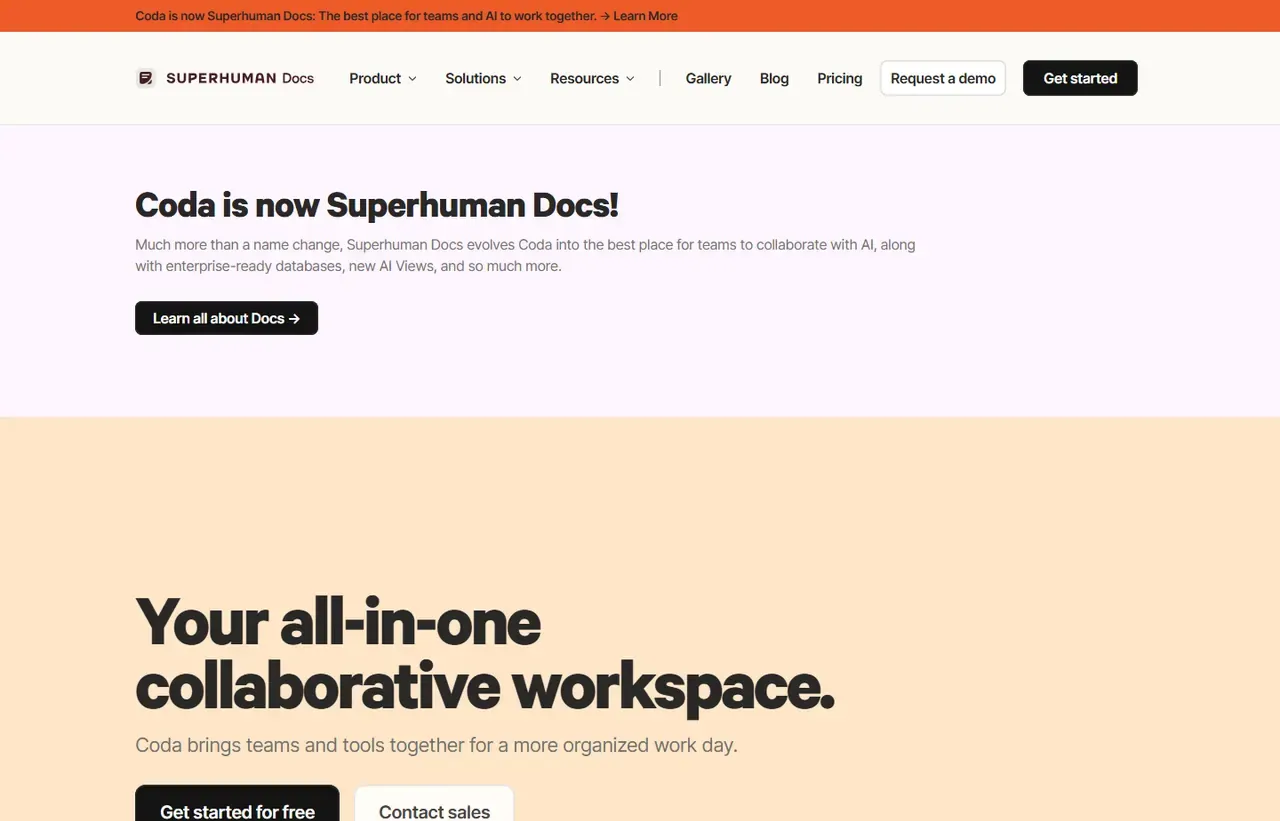
Captured by us in August 2026 at 1440px, unedited. Interfaces change, so these show the product as it looked on the date we verified this profile. Vendors localise pricing by visitor region, so a pricing screenshot may display a different currency to the USD figures recorded above.

Our assessment
Coda is the most capable tool in this category and the hardest to get a team to adopt. Because tables carry real formulas and buttons can run automations, a Coda doc can replace a small internal application, and the per-Doc-Maker pricing is genuinely clever: only the people building pay, while everyone reading or filling things in is free. That suits the pattern these tools follow in practice, where one person builds and twenty consume. The reservations are learning curve and ownership. It asks more of a builder than Notion does, and it has now passed from Coda to Grammarly to a company called Superhuman, which is a lot of corporate change for a tool you are asked to build your processes on.
What works in Coda
- Real formulas and automations, so docs can replace internal tools
- Only Doc Makers are charged, making wide read access free
- Packs give genuine two-way integration with other systems
- Free tier is usable for evaluating properly
What doesn't
- Steeper learning curve than Notion for builders
- Weaker than Notion for plain writing and note-taking
- Two ownership changes in recent years, now branded Superhuman
- Complex docs become slow and hard for others to maintain
EveryAny Decision Score
Scored by dimension rather than averaged into one number, because the trade-offs are the useful part. 3 of these 8 dimensions are calculated from verified facts by published formula; the rest are editorial judgement, labelled as such. How each score is calculated.
- Cost position2.5/10
derivedentry tier at $12 a month against a category median of $9.99 across 24 comparable tools
- Portability5/10
derivedpublic API
- Subscription flexibility6/10
derivedfree plan, subscription, monthly billing
- Feature depth9/10
editorialeditorial judgement, reviewed at last check
- Ease of learning4/10
editorialeditorial judgement, reviewed at last check
- Collaboration8/10
editorialeditorial judgement, reviewed at last check
- AI capability7/10
editorialeditorial judgement, reviewed at last check
- Professional adoption6/10
editorialeditorial judgement, reviewed at last check
What leaving Coda would cost
moderate lock-in
Calculated as 10 minus a portability score of 5, built from four signals (self-hosting, a public API, open-source licensing and a documented export path) . Coda scores on: public API. Formula.
Coda competitors and alternatives
| Alternative | Why you might pick it instead |
|---|---|
| Notion | Better for writing and far easier for a whole team to adopt. |
| Airtable | Stronger as a database, weaker as a document. |
| Smartsheet | More rigid and more familiar to teams that think in spreadsheets. |

Notion
Productivity
Connected workspace combining docs, databases, wikis and project tracking.

Airtable
Productivity
A relational database wearing a spreadsheet's interface.
Coda is now Superhuman Docs
Anyone evaluating Coda should know this before signing up. Visit coda.io/pricing today and the buttons
read “Get Superhuman Free”, “Get Superhuman Pro” and “Get Superhuman Business”, linking to
superhuman.com. The Superhuman homepage lists three products: Mail, Grammarly and Docs, and Docs is
Coda.
The lineage is that Coda was acquired by Grammarly, and Grammarly subsequently rebranded the company as Superhuman after acquiring the email client of that name. So the tool you may have evaluated as an independent product is now one of three inside a company with a different name.
We record this because it is a real consideration and not a criticism in itself. The product continues to be developed and the pricing has not jumped. But if you are choosing where to build your team’s processes for the next five years, two ownership changes and a corporate rename are legitimate things to weigh, and nothing on the Coda marketing site tells you plainly.
Per Doc Maker is the pricing idea worth understanding
Coda charges only for Doc Makers, the people who create and edit doc structure. Everyone who reads a doc, fills in a form, ticks a checkbox or comments is free.
| Plan | Billed annually | Billed monthly |
|---|---|---|
| Pro | $12 per Doc Maker/month | $15 |
| Business | $33 per Doc Maker/month | $40 |
For the way these tools are actually used, that is a genuinely good deal. A fifty-person company where three people build internal tools pays for three seats, where Notion would charge for fifty. Run that comparison with your real builder count, because it is often the deciding number.
Where the power actually is
A Coda table is not a formatted list; it is data with formulas that reference other tables. A button can write rows, send a Slack message or call an API. Packs pull live data in from Jira, Google Calendar or GitHub and push actions back out.
The practical result is that processes which would otherwise be a spreadsheet, a form and someone’s memory can live in one document that actually enforces them. That is a meaningfully higher ceiling than Notion’s databases reach.
The adoption problem is real
Everything above requires someone to build it, and building in Coda is closer to light programming than to writing a document. Teams that succeed with it have a person who enjoys that. Teams that do not end up with two half-built docs and a return to spreadsheets.
Notion is worse at this and much easier to adopt, which is why it is more popular despite being less capable. Be honest about whether you have the builder before choosing the more powerful tool.
Coda questions, answered
- Is Coda worth it?
- Coda is the most capable tool in this category and the hardest to get a team to adopt.
- How much does Coda cost?
- Free; Pro $12 per Doc Maker/month billed annually. The cheapest paid tier we recorded works out at $12 a month, or $144 over a year. Verified against the vendor's pricing page.
- Does Coda have a free plan or free trial?
- Coda has a free plan. No free trial is offered.
- What is the best Coda alternative?
- It depends on the job. Notion: Better for writing and far easier for a whole team to adopt. Airtable: Stronger as a database, weaker as a document. Smartsheet: More rigid and more familiar to teams that think in spreadsheets.
- Can I self-host Coda?
- No. Coda is a hosted service only, so your data lives on the vendor's infrastructure.
Provenance and freshness
When each fact was last checked
- Pricing ·
- Plans ·
- Free trial
- Features
- Platforms
- Integrations
- Affiliate programme
- Company details ·
What has changed
-
August 2026
- Pricing verified per Doc Maker, annual and monthly
- Recorded that the product is now sold under the Superhuman brand
- Added plan picker and verdicts
Sources & verification
Facts on this page were read from the sources below on the dates shown. Where a vendor does not publish a figure, we record it as not disclosed rather than estimating it.
- Coda pricing - checked 9 August 2026
- Superhuman product lineup, listing Docs alongside Mail and Grammarly - checked 9 August 2026
Spotted something out of date? Email [email protected] and we will re-check it. Corrections are logged on the page.


