

Miro
The whiteboard that survived the end of the meeting room.
- Productivity
- Design
- Development
- from $8/mo
Miro is an infinite collaborative canvas for workshops, diagrams, planning and product discovery, with templates, sticky notes, frameworks and real-time multiplayer editing. It became the default for distributed workshops because it made the whiteboard portion of a meeting work as well remotely as in a room, and often better.
Miro: the short answer
Every line below is drawn from facts verified on 9 August 2026.
- What it is
- The whiteboard that survived the end of the meeting room
- Best for
- Distributed teams running workshops and retrospectives
- Starts at
- Free plan available; Starter from $8/month per member billed yearly
- Free option
- Free plan available, 14 days on Business trial
- Biggest strength
- Best-in-class canvas performance and multiplayer editing
- Biggest drawback
- Very large boards slow down and become hard to navigate
- Closest alternative
- FigJam - Cheaper and sufficient if your team already pays for Figma
- True annual cost
- from $240 a year at the cheapest paid tier
Miro at a glance
| Best for | Distributed teams running workshops and retrospectives, Product discovery, journey mapping and service design, Diagramming and architecture with many contributors |
|---|---|
| Category | Productivity, Design, Development |
| Starting price | Free plan available; Starter from $8/month per member billed yearly |
| Free plan | Yes |
| Free trial | 14 days on Business |
| Pricing model | freemium |
| Company | Miro (RealtimeBoard, Inc.) |
| Founded | 2011 |
| Headquarters | San Francisco, California, and Amsterdam, Netherlands |
| Founders | Andrey Khusid, Oleg Shardin |
| Platforms | Web, Windows, macOS, iOS, Android |
| Public API | Yes |
| Browser extension | No |
| Mobile apps | iOS + Android |
| Self-hosting | No |
| Affiliate programme | No |
| Data source | Vendor pricing page and public records |
| Last checked | August 2026 |
Miro pricing
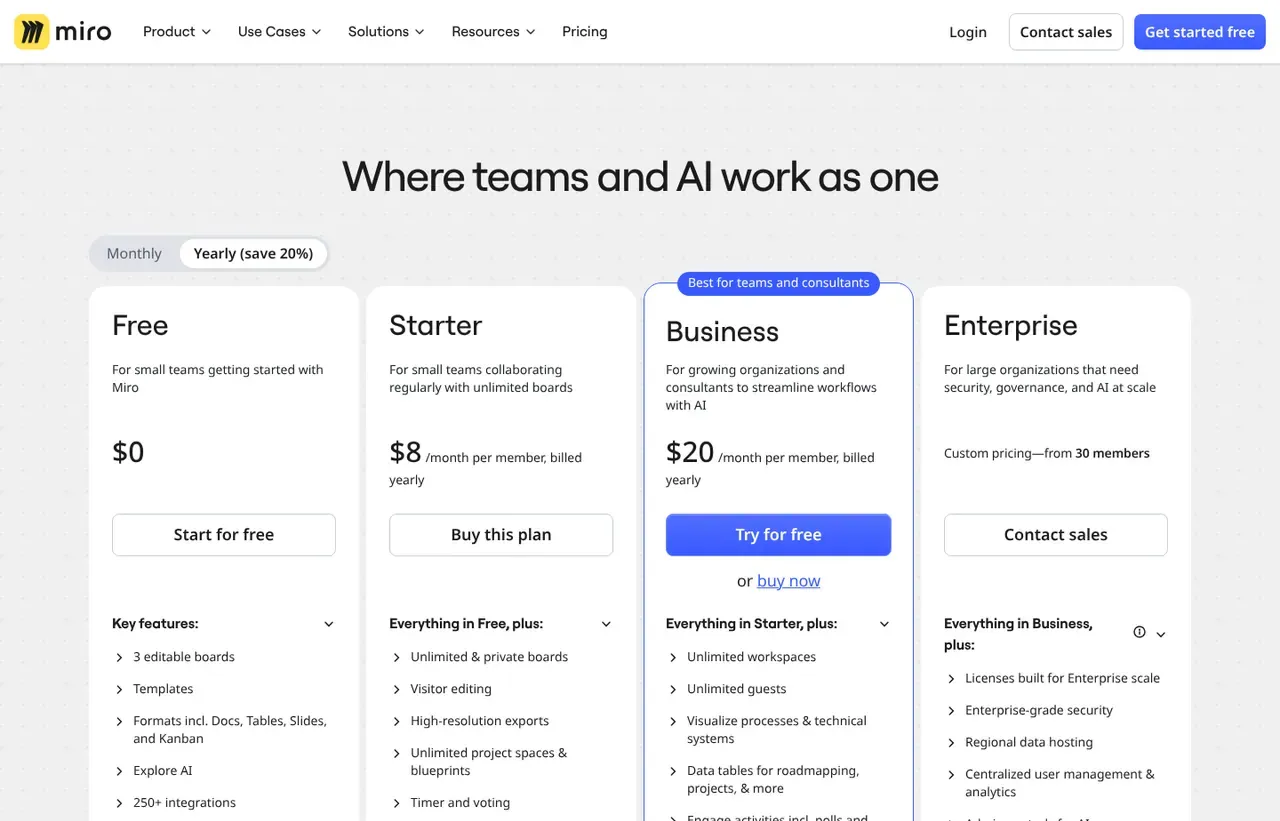
Prices below were read from the vendor's own pricing page on 9 August 2026. Pricing model: freemium. Free trial: 14 days on Business.
| Plan | Price | Billing | Notes |
|---|---|---|---|
| Free | $0 | per month | 3 editable boards, unlimited team members |
| Starter | $8 | per month | per member, billed yearly - Unlimited boards, private boards, 25 AI credits per member |
| Business | $20 | per month | per member, billed yearly - Adds SSO, private folders and unlimited guests |
| Enterprise | Custom | Negotiated | Advanced security, admin controls and flexible licensing |
What Miro actually costs over a year
A monthly price is not the same thing as a monthly contract. These are the plans above multiplied out to twelve months, per seat or unit where the plan is charged that way.
| Plan | Monthly | Over 12 months |
|---|---|---|
| Starterper member, billed yearly | $8 | $96 |
| Businessper member, billed yearly | $20 | $240 |
Which Miro plan should you buy?
| Your situation | Recommended | Why |
|---|---|---|
| You run occasional workshops | Free | Three editable boards with unlimited members. The board count is the constraint, not people. |
| You run workshops regularly | Starter | $8 per member billed yearly for unlimited boards and private boards. |
| You need SSO, private folders and unlimited guests | Business | $20 per member. Unlimited guests matters if you facilitate with clients. |
| You already use FigJam or Microsoft Whiteboard | Do not buy Miro | Both are adequate and likely already paid for. Miro is better, not indispensable. |
| You need the output to become a document | Do not rely on Miro | Boards are a thinking space, not a deliverable. Plan how insights move into a document or tracker afterwards. |
Verdict by who you are
Distributed team running retrospectivesYes
The best remote workshop tool available, and unlimited members on every tier means participants never blocked by licensing.
Product or service designerYes
Journey mapping and discovery work fit this format better than any document tool.
Figma-using teamCompare first
FigJam is included with Figma and covers most of the same ground.
Team needing structured project trackingNo
Boards do not track work. Use a tracker alongside, not instead.
Should you buy Miro?
Buy Miro if…
- Distributed teams running workshops and retrospectives
- Product discovery, journey mapping and service design
- Diagramming and architecture with many contributors
Do not buy Miro if…
- Teams needing structured project tracking
- Organisations already standardised on FigJam or Whiteboard
- Anyone who needs the output to become a document
Key features
- Infinite canvas with real-time multiplayer editing
- Very large template library for workshops and frameworks
- Sticky notes, voting, timers and facilitation tools
- Diagramming with shapes, connectors and flowcharts
- Miro AI for clustering notes and generating summaries
- Talktrack for recording walkthroughs of a board
- Interactive presentation mode from the canvas
- Two-way sync with Jira, Asana and Azure DevOps
Integrations
- Jira and Confluence
- Slack and Microsoft Teams
- Figma
- Asana and monday.com
- Google Workspace and Microsoft 365
- Miro REST API and developer platform
Miro screenshots
Captured by us in August 2026 at 1440px, unedited. Interfaces change, so these show the product as it looked on the date we verified this profile. Pricing pages are captured from a US vantage point, so the currency shown matches the USD figures recorded above.

Our assessment
Miro is the best collaborative canvas available and the category leader by some distance, with a template library and facilitation toolset that make remote workshops genuinely work. The free tier is unusually generous in the right way: unlimited members, limited boards, so a whole team can participate without licences. Two caveats matter. Large boards become slow and disorganised without discipline, and the output resists being turned into anything else, so decisions made on a canvas need writing down somewhere durable. If you already pay for Figma, FigJam covers a good share of the same ground.
What works in Miro
- Best-in-class canvas performance and multiplayer editing
- Enormous template library covering most workshop formats
- Free tier allows unlimited members, so nobody is excluded
- Two-way Jira sync keeps planning boards connected to delivery
What doesn't
- Very large boards slow down and become hard to navigate
- Board sprawl is the norm without an owner and naming conventions
- Output does not translate into documents or trackers
- Overlaps with FigJam and Whiteboard that many teams already own
EveryAny Decision Score
Scored by dimension rather than averaged into one number, because the trade-offs are the useful part. 3 of these 8 dimensions are calculated from verified facts by published formula; the rest are editorial judgement, labelled as such. How each score is calculated.
- Cost position0.8/10
derivedentry tier at $20 a month against a category median of $9.99 across 24 comparable tools
- Portability5/10
derivedpublic API
- Subscription flexibility9/10
derivedfree plan, free trial, freemium, monthly billing
- Feature depth8/10
editorialeditorial judgement, reviewed at last check
- Ease of learning8/10
editorialeditorial judgement, reviewed at last check
- Collaboration10/10
editorialeditorial judgement, reviewed at last check
- AI capability6/10
editorialeditorial judgement, reviewed at last check
- Professional adoption9/10
editorialeditorial judgement, reviewed at last check
What leaving Miro would cost
moderate lock-in
Calculated as 10 minus a portability score of 5, built from four signals (self-hosting, a public API, open-source licensing and a documented export path) . Miro scores on: public API. Formula.
Miro competitors and alternatives
| Alternative | Why you might pick it instead |
|---|---|
| FigJam | Cheaper and sufficient if your team already pays for Figma. |
| Microsoft Whiteboard | Included with Microsoft 365, and considerably less capable. |
| Excalidraw | Free, open source and excellent for quick technical diagrams. |

The free tier is limited in the right place
Miro caps boards, not people. Three editable boards with unlimited team members means everyone can join a workshop without a licence conversation, which is exactly the right constraint for a tool whose value depends on participation. Compare that with tools that cap collaborators and force you to buy seats for people who contribute once a quarter.
What you actually pay for at Starter
Unlimited boards and private boards. For a team running weekly retrospectives and quarterly planning, three boards runs out in the first month, so Starter at $8 is the realistic plan. Business at $20 is bought for SSO and unlimited guests, which is an administration and external-collaboration purchase rather than a capability one.
The problem nobody warns you about
Boards accumulate. Eighteen months in, a typical Miro account has hundreds of half-finished canvases with no naming convention, and finding last quarter’s planning board takes longer than recreating it. The tools to prevent this exist, folders, templates and naming rules, but nothing enforces them. Decide the convention before rollout, not after.
Miro or FigJam?
If your organisation already pays for Figma, start with FigJam. It covers workshops, diagrams and sticky-note sessions well, and the marginal cost is nothing. Miro is worth the separate line item when facilitation is a regular practice rather than an occasional one, when non-designers are the main users, or when you need the Jira integration and the deeper template library.
Miro questions, answered
- Is Miro worth it?
- Miro is the best collaborative canvas available and the category leader by some distance, with a template library and facilitation toolset that make remote workshops genuinely work.
- How much does Miro cost?
- Free plan available; Starter from $8/month per member billed yearly. The cheapest paid tier we recorded works out at $20 a month, or $240 over a year. Verified against the vendor's pricing page.
- Does Miro have a free plan or free trial?
- Miro has a free plan. A free trial is available: 14 days on Business.
- What is the best Miro alternative?
- It depends on the job. FigJam: Cheaper and sufficient if your team already pays for Figma. Microsoft Whiteboard: Included with Microsoft 365, and considerably less capable. Excalidraw: Free, open source and excellent for quick technical diagrams.
- Can I self-host Miro?
- No. Miro is a hosted service only, so your data lives on the vendor's infrastructure.
Provenance and freshness
When each fact was last checked
- Pricing ·
- Plans ·
- Free trial
- Features
- Platforms
- Integrations
- Affiliate programme
- Company details
What has changed
-
August 2026
- Per-member pricing verified, billed yearly
- Added plan picker and verdicts
Sources & verification
Facts on this page were read from the sources below on the dates shown. Where a vendor does not publish a figure, we record it as not disclosed rather than estimating it.
- Miro pricing - checked 9 August 2026
Spotted something out of date? Email [email protected] and we will re-check it. Corrections are logged on the page.


