

Sketch
The Mac design tool that Figma overtook, still the best native app.
- Design
- Development
- from $12/mo
Sketch is a interface design tool for macOS, with a companion web app for viewing, commenting and developer handoff. It defined the category before browser-based tools existed, and remains the choice for designers who want a fast native application and files stored locally rather than a workspace that only exists online.
Sketch: the short answer
Every line below is drawn from facts verified on 9 August 2026.
- What it is
- The Mac design tool that Figma overtook, still the best native app
- Best for
- Mac-based designers who want a fast native application
- Starts at
- Standard $12 per editor/month billed yearly; Mac-only licence $120 one-time
- Free option
- No free plan, 30 days trial
- Biggest strength
- Native Mac app is faster and works fully offline
- Biggest drawback
- macOS only for editing, which rules out mixed-platform teams
- Closest alternative
- Figma - Cross-platform, better collaboration, and where the industry went
- True annual cost
- from $144 a year at the cheapest paid tier
Sketch at a glance
| Best for | Mac-based designers who want a fast native application, Teams needing offline work and local file storage, Anyone wanting a one-time purchase rather than a subscription |
|---|---|
| Category | Design, Development |
| Starting price | Standard $12 per editor/month billed yearly; Mac-only licence $120 one-time |
| Free plan | No |
| Free trial | 30 days |
| Pricing model | subscription |
| Company | Sketch B.V. |
| Founded | 2010 |
| Headquarters | The Hague, Netherlands |
| Founders | Pieter Omvlee, Emanuel Sá |
| Platforms | macOS, Web, iOS |
| Public API | Yes |
| Browser extension | No |
| Mobile apps | iOS |
| Self-hosting | No |
| Affiliate programme | No |
| Data source | Vendor pricing page and public records |
| Last checked | August 2026 |
Sketch pricing
Prices below were read from the vendor's own pricing page on 9 August 2026. Pricing model: subscription. Free trial: 30 days.
| Plan | Price | Billing | Notes |
|---|---|---|---|
| Standard | $12 | per month | per editor - Billed yearly. Unlimited documents, unlimited free viewers, version history |
| Professional | $24 | per month | per editor - Billed yearly. Adds SSO, project archiving and permission groups |
| Enterprise | $44 | per month | per editor - Billed yearly. Adds SCIM, BYOK encryption and dedicated support |
| Private Cloud | Contact sales | Negotiated | Private environment, choice of hosting location, unlimited workspaces |
| Mac-only licence | $120 | per one-time | per seat - Yours to keep. Includes one year of updates. No collaboration features |
What Sketch actually costs over a year
A monthly price is not the same thing as a monthly contract. These are the plans above multiplied out to twelve months, per seat or unit where the plan is charged that way.
| Plan | Monthly | Over 12 months |
|---|---|---|
| Standardper editor | $12 | $144 |
| Professionalper editor | $24 | $288 |
| Enterpriseper editor | $44 | $528 |
Which Sketch plan should you buy?
| Your situation | Recommended | Why |
|---|---|---|
| You work alone on a Mac and want no subscription | Mac-only licence | $120 once, yours to keep, with a year of updates. Read the exclusions: no collaboration, no online sharing. |
| You are a solo designer who shares work for review | Standard | $12 per editor billed yearly, and unlimited Viewers cost nothing. |
| Your team needs SSO and permission groups | Professional | $24 per editor. Bought for governance rather than for any drawing capability. |
| You have Windows or Linux machines in the team | Do not buy Sketch | Editing is macOS only, so a mixed-platform team is blocked immediately. Use Figma. |
| You need designers and developers collaborating live | Consider Figma instead | Sketch's collaboration works but is behind, and the industry has standardised elsewhere. |
Verdict by who you are
Solo Mac designerYes
Fast native app, files on your own disk, and the only credible one-time licence left in professional design software.
Design team on mixed platformsNo
macOS-only editing rules this out entirely, regardless of the product's quality.
Team hiring designers regularlyNo
New designers arrive fluent in Figma. Training them on Sketch is an avoidable cost.
Studio that values offline work and local filesCompare first
Genuine advantages, weighed against a shrinking ecosystem and plugin base.
Should you buy Sketch?
Buy Sketch if…
- Mac-based designers who want a fast native application
- Teams needing offline work and local file storage
- Anyone wanting a one-time purchase rather than a subscription
Do not buy Sketch if…
- Windows or Linux designers
- Teams where non-designers need to edit
- Organisations already standardised on Figma
Key features
- Native macOS application, fast and fully offline capable
- Real-time collaboration on Sketch's web workspace
- Unlimited free Viewers on every subscription
- Symbols, shared libraries and design tokens
- Prototyping with the iPhone and iPad app for mirroring
- Developer handoff with measurements and asset export
- Version history on cloud documents
- Large ecosystem of community plugins
Integrations
- Jira and Confluence
- Slack
- Zeplin and Storybook
- Figma and Adobe file import
- Sketch API and plugin SDK
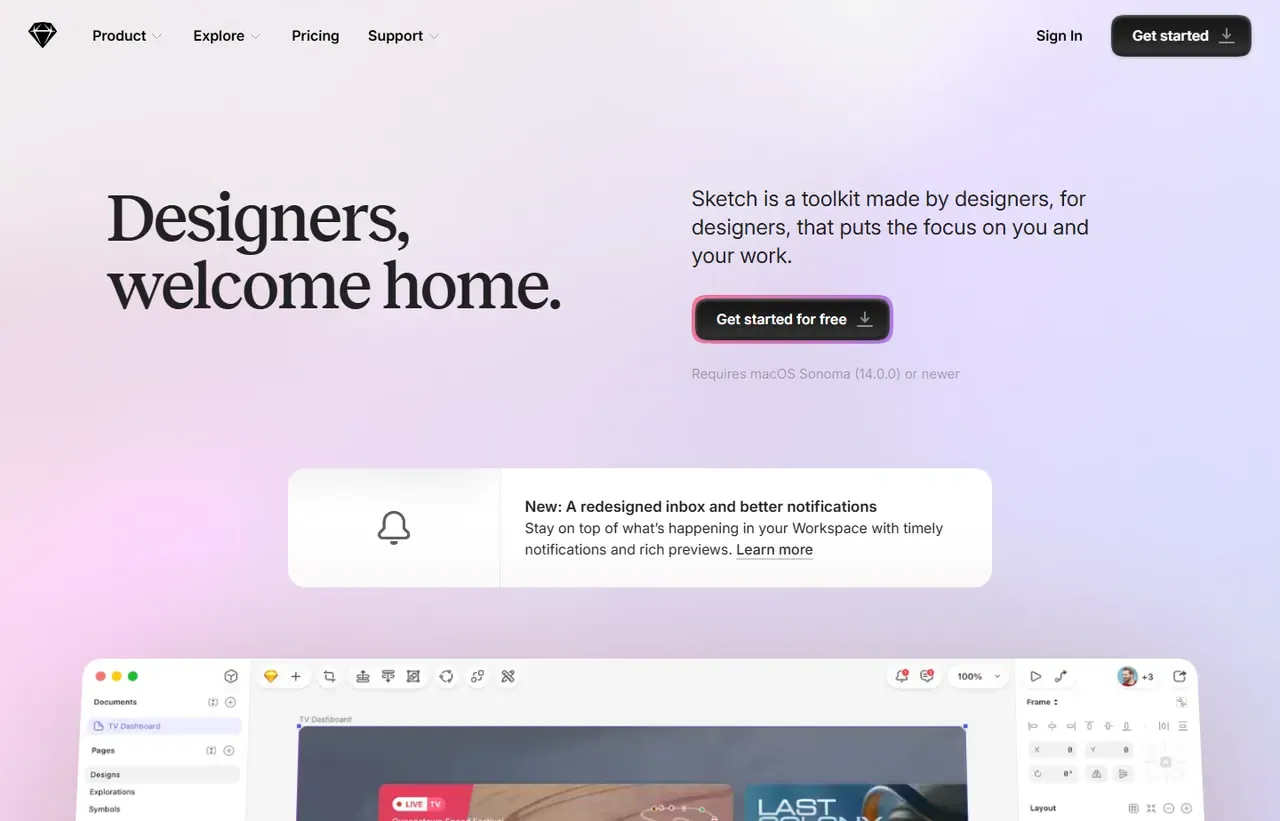
Sketch screenshots
Captured by us in August 2026 at 1440px, unedited. Interfaces change, so these show the product as it looked on the date we verified this profile. Vendors localise pricing by visitor region, so a pricing screenshot may display a different currency to the USD figures recorded above.

Our assessment
Sketch lost the category and is still a good tool. The native Mac app is faster and more responsive than anything running in a browser, files can live on your own disk, and the Mac-only licence at $120 is the last credible one-time purchase in professional design software. Free unlimited Viewers is also the right call, since most people who open a design file never edit it. What has changed is gravitational. Figma runs on Windows, hires can already use it, plugins and design systems target it, and the collaboration is genuinely better. Choosing Sketch in 2026 means accepting that your team is Mac-only and that new designers will need to adapt. For a small studio that fits, it is defensible. For most organisations it is not.
What works in Sketch
- Native Mac app is faster and works fully offline
- Unlimited free Viewers on every subscription
- Mac-only licence at $120 is a genuine one-time purchase
- Bootstrapped and independent, with no investor exit pressure
What doesn't
- macOS only for editing, which rules out mixed-platform teams
- Collaboration is behind Figma's
- Industry hiring and plugin ecosystem now assume Figma
- Mac-only licence includes just one year of updates
EveryAny Decision Score
Scored by dimension rather than averaged into one number, because the trade-offs are the useful part. 3 of these 8 dimensions are calculated from verified facts by published formula; the rest are editorial judgement, labelled as such. How each score is calculated.
- Cost position5/10
derivedentry tier at $12 a month against a category median of $19.99 across 6 comparable tools
- Portability6/10
derivedpublic API, documented export
- Subscription flexibility6/10
derivedfree trial, subscription, monthly billing
- Feature depth7/10
editorialeditorial judgement, reviewed at last check
- Ease of learning8/10
editorialeditorial judgement, reviewed at last check
- Collaboration5/10
editorialeditorial judgement, reviewed at last check
- AI capability3/10
editorialeditorial judgement, reviewed at last check
- Professional adoption5/10
editorialeditorial judgement, reviewed at last check
What leaving Sketch would cost
moderate lock-in
Calculated as 10 minus a portability score of 6, built from four signals (self-hosting, a public API, open-source licensing and a documented export path) . Sketch scores on: public API, documented export. Formula.
Sketch competitors and alternatives
| Alternative | Why you might pick it instead |
|---|---|
| Figma | Cross-platform, better collaboration, and where the industry went. |
| Penpot | Open source and self-hostable, free for unlimited users. |
| Adobe XD | Effectively discontinued; not a serious option for new work. |

The one-time licence still exists
This is genuinely unusual now and worth knowing about. Alongside the subscriptions, Sketch sells a Mac-only licence at $120 per seat, described on their page as “Yours to keep, forever,” including one year of updates.
Read the exclusions, because they are substantial. It has no collaborative features, no online document sharing and no iOS previewing, and there is no free trial for it. It is the native app, working offline, saving files locally.
For a solo designer who works alone on a Mac and does not need a shared workspace, that is a real alternative to paying forever. After the first year you keep the version you have; further updates require buying again.
Subscriptions, all quoted yearly
| Plan | Per editor/month | Adds |
|---|---|---|
| Standard | $12 | Collaboration, unlimited docs, version history |
| Professional | $24 | SSO, project archiving, permission groups |
| Enterprise | $44 | SCIM, BYOK encryption, dedicated support |
| Private Cloud | Quote | Private environment, hosting location choice |
Those figures are the yearly-billed rates; the page has a Monthly toggle that costs more. The trial is 30 days with no credit card.
Viewers are free and unlimited on every plan. Only editors are charged, which matters because in most organisations the people opening design files vastly outnumber the people changing them. That makes Sketch cheaper than the seat count suggests, and it is the same insight behind Coda’s Doc Maker pricing.
The Mac-only constraint is the decision
Editing happens in the native macOS app. The web app is for viewing, commenting and handoff. So a designer on Windows cannot design in Sketch, and a team with any Windows or Linux machines is immediately constrained.
Figma runs anywhere there is a browser. That single difference, more than any feature, is why the industry moved, and it is not something Sketch can answer without abandoning the native app that makes it good.
What you actually give up by choosing it
Hiring. New designers arrive fluent in Figma. Design systems, plugin ecosystems, handoff tooling and tutorials all target Figma first. Collaboration in Sketch works but feels like a feature added to a document tool rather than the foundation of one.
None of that makes Sketch bad. It makes it a specialist choice: a fast, native, independent, Mac-only tool with an honest one-time option. If those words describe what you want, it is still the best version of that thing.
Sketch questions, answered
- Is Sketch worth it?
- Sketch lost the category and is still a good tool.
- How much does Sketch cost?
- Standard $12 per editor/month billed yearly; Mac-only licence $120 one-time. The cheapest paid tier we recorded works out at $12 a month, or $144 over a year. Verified against the vendor's pricing page.
- Does Sketch have a free plan or free trial?
- Sketch has no free plan. A free trial is available: 30 days.
- What is the best Sketch alternative?
- It depends on the job. Figma: Cross-platform, better collaboration, and where the industry went. Penpot: Open source and self-hostable, free for unlimited users. Adobe XD: Effectively discontinued; not a serious option for new work.
- Can I self-host Sketch?
- No. Sketch is a hosted service only, so your data lives on the vendor's infrastructure.
Provenance and freshness
When each fact was last checked
- Pricing ·
- Plans ·
- Free trial
- Features
- Platforms
- Integrations
- Affiliate programme
- Company details
What has changed
-
August 2026
- Pricing re-checked, including the one-time Mac-only licence and its exclusions
- Added plan picker and verdicts
Sources & verification
Facts on this page were read from the sources below on the dates shown. Where a vendor does not publish a figure, we record it as not disclosed rather than estimating it.
- Sketch pricing - checked 9 August 2026
Spotted something out of date? Email [email protected] and we will re-check it. Corrections are logged on the page.

