

Confluence
The corporate wiki, and the place Jira tickets point to for context.
- Productivity
- Development
- from $5.42/mo
Confluence is Atlassian's team workspace for documentation: pages organised into spaces, with permissions, templates and comments. Its real position is adjacency to Jira, where a ticket links to the requirements page and the requirements page links back, which is why it remains standard in organisations that plan work in Atlassian tools.
Confluence: the short answer
Every line below is drawn from facts verified on 9 August 2026.
- What it is
- The corporate wiki, and the place Jira tickets point to for context
- Best for
- Organisations already running Jira
- Starts at
- Free for 10 users; Standard $5.42 per user/month at 300 users
- Free option
- Free plan available, 7 days trial
- Biggest strength
- Automatic two-way linking with Jira issues
- Biggest drawback
- Editor is noticeably less pleasant than Notion's
- Based on
- Primary-source research, not hands-on use
- Closest alternative
- Notion - Far more pleasant to write in, with weaker enterprise permissions
- True annual cost
- from $65.04 a year on Standard, the cheapest paid tier ($5.42 a month)
Confluence at a glance
| Best for | Organisations already running Jira, Structured documentation with real permission requirements, Teams needing a wiki that scales to thousands of users |
|---|---|
| Category | Productivity, Development |
| Starting price | Free for 10 users; Standard $5.42 per user/month at 300 users |
| Free plan | Yes |
| Free trial | 7 days |
| Pricing model | subscription |
| Company | Atlassian Corporation |
| Founded | 2004 |
| Headquarters | Sydney, New South Wales, Australia |
| Founders | Mike Cannon-Brookes, Scott Farquhar |
| Platforms | Web, iOS, Android |
| Public API | Yes |
| Browser extension | No |
| Mobile apps | iOS + Android |
| Self-hosting | No |
| Affiliate programme | No |
| Data source | Vendor pricing page and public records |
| Last checked | August 2026 |
Confluence pricing
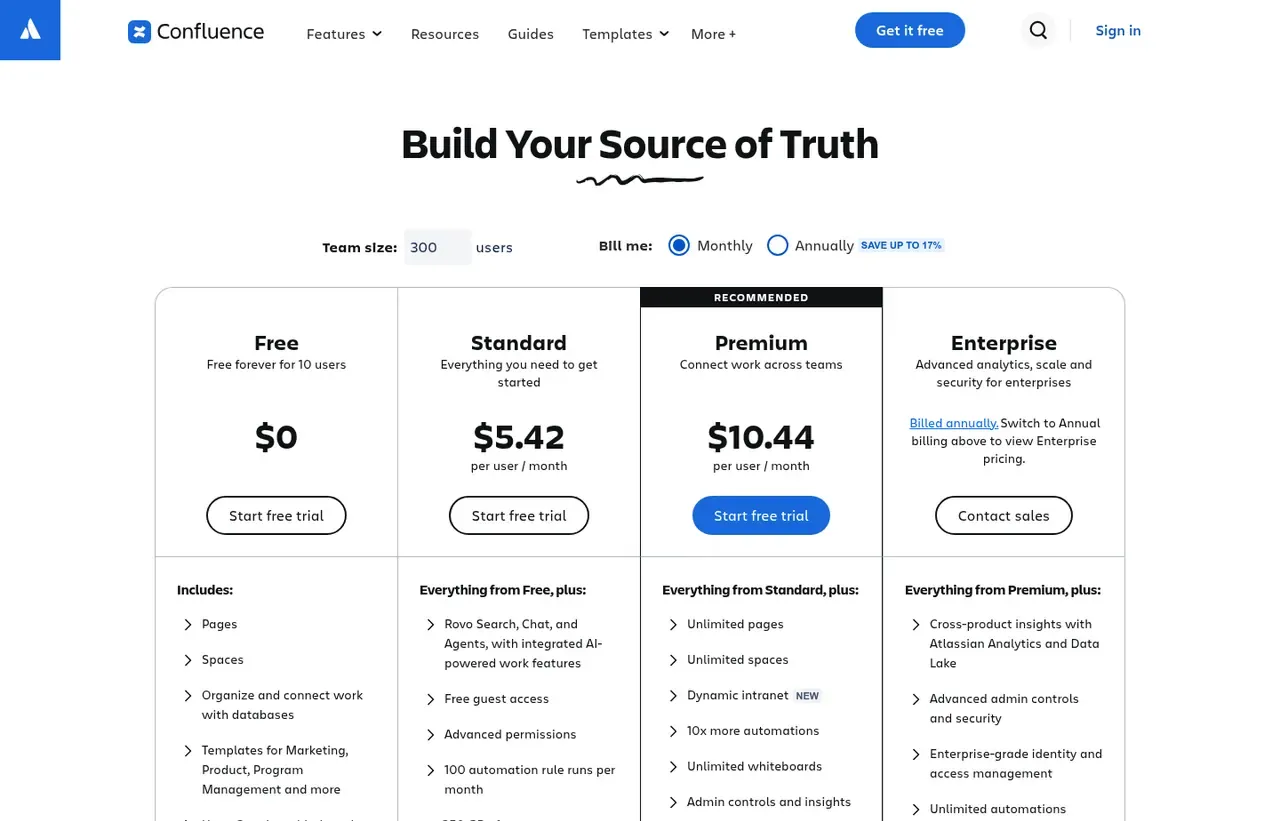
Prices below were read from the vendor's own pricing page on 9 August 2026. Pricing model: subscription. Free trial: 7 days.
| Plan | Price | Billing | Notes |
|---|---|---|---|
| Free | $0 | per month | Up to 10 users, one site, 2 GB storage, 10 automation runs per month |
| Standard | $5.42 | per month | per user - Rate shown at 300 users. 250 GB storage, 100 automation runs, 9/5 support |
| Premium | $10.44 | per month | per user - Rate shown at 300 users. Unlimited storage and whiteboards, 24/7 critical support |
| Enterprise | Contact sales | Negotiated | Annual billing only. Up to 150 sites, 99.95% uptime SLA |
What Confluence actually costs over a year
A monthly price is not the same thing as a monthly contract. These are the plans above resolved both ways, per seat or unit where the plan is charged that way. Where a vendor quotes only a yearly figure it is divided by twelve rather than left out, and the Quoted column says which figure the vendor actually publishes.
| Plan | Quoted | Monthly | Over 12 months |
|---|---|---|---|
| Standardper user | per month | $5.42 | $65.04 |
| Premiumper user | per month | $10.44 | $125.28 |
Which Confluence plan should you buy?
| Your situation | Recommended | Why |
|---|---|---|
| A team of ten or fewer needs a wiki | Free | Up to 10 users on one site. Watch the 10 automation runs a month, which a single rule exhausts immediately. |
| You run Jira and need documentation beside it | Standard | The automatic two-way linking with Jira issues is the entire reason to choose Confluence. |
| You need unlimited storage and 24/7 support for critical issues | Premium | Roughly double Standard, bought for operational guarantees rather than editing features. |
| You need multiple sites or Atlassian Analytics | Enterprise | Annual billing only, and its price is not shown until you switch the billing toggle. |
| You are pricing it for a small team | Enter your own headcount first | The advertised per-user rates assume a default team size of 300. A ten-person team pays more per user. |
| You do not use Jira | Consider Notion instead | Without the Jira relationship, Notion is more pleasant and people keep it up to date. |
Verdict by who you are
Organisation running JiraYes
Issue-to-page linking removes the copy-paste-and-drift problem that afflicts every other tracker and wiki combination.
Enterprise with audit requirementsYes
Space and page permissions are granular enough to satisfy auditors, which Notion's are not.
Small team wanting a pleasant workspaceNo
The editor is the least enjoyable here, and unloved wikis rot.
Team wanting databases and light app buildingNo
That is Notion or Coda territory. Confluence is documentation.
Should you buy Confluence?
Buy Confluence if…
- Organisations already running Jira
- Structured documentation with real permission requirements
- Teams needing a wiki that scales to thousands of users
Do not buy Confluence if…
- Small teams wanting a flexible, pleasant workspace
- Anyone who dislikes Atlassian's interface conventions
- Databases and lightweight app building
Key features
- Pages organised into spaces with inherited permissions
- Automatic two-way linking with Jira issues
- Templates for requirements, retrospectives and decisions
- Page history, comparison and restore
- Inline and page-level comments with mentions
- Whiteboards and databases for less structured work
- Rovo AI search, chat and agents from Standard upward
- Automation rules, metered per plan
Integrations
- Jira and Bitbucket
- Slack and Microsoft Teams
- Google Drive
- Figma
- Confluence REST API and a large Marketplace
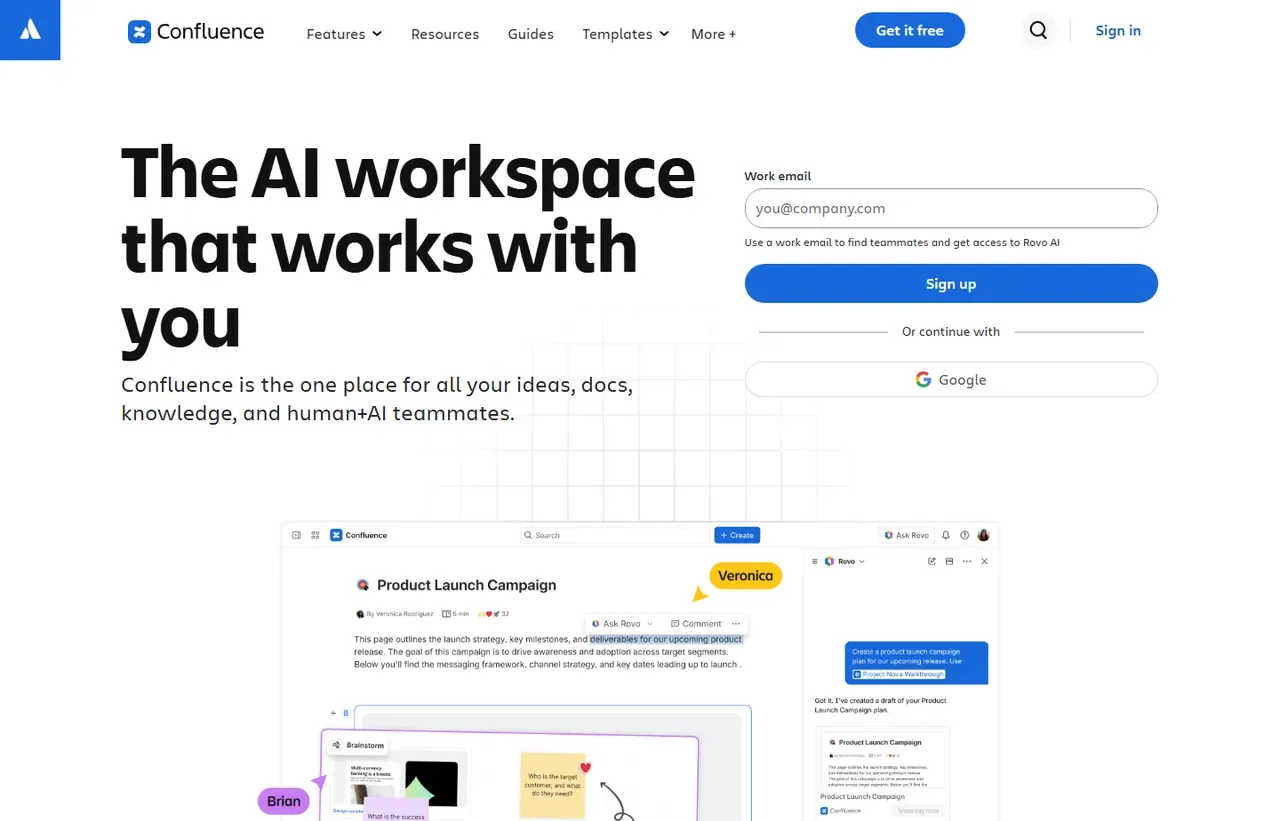
Confluence screenshots
Captured by us in August 2026 at 1440px, unedited. Interfaces change, so these show the product as it looked on the date we verified this profile. Pricing pages are captured from a US vantage point, so the currency shown matches the USD figures recorded above.
Our assessment
Confluence is chosen for where it sits rather than how it feels. If your organisation plans in Jira, the automatic linking between issues and documentation removes real friction, permissions are genuinely granular, and it scales to hundreds of thousands of users without complaint. Those are serious enterprise virtues. It is also the tool people are least happy writing in: the editor is slower and more awkward than Notion's, search has historically been weak, and pages accumulate into a sprawl nobody prunes. Read the pricing carefully too, because the per-user rate on Atlassian's page is quoted at a default team size of 300 and rises for smaller teams.
What works in Confluence
- Automatic two-way linking with Jira issues
- Granular space and page permissions that satisfy audit
- Scales to very large user counts on one site
- Free tier for up to 10 users is genuinely usable
What doesn't
- Editor is noticeably less pleasant than Notion's
- Displayed per-user price assumes a 300-user team
- Automation runs are metered, and Free allows only 10 a month
- Content sprawls without active curation
EveryAny Decision Score
3 of these 8 dimensions are calculated from verified facts; the rest are our judgement, shown as a band rather than a figure unless something specific sits behind them. How each score works.
- Cost position8.2/10
derivedentry tier at $5.42 a month against a category median of $9.99 a month across 28 comparable tools
- Portability5/10
derivedpublic API
- Subscription flexibility8/10
derivedfree plan, free trial, subscription, monthly billing
- Feature depthHigh
editorialour judgement, with no measurement behind it
- Ease of learningModerate
editorialour judgement, with no measurement behind it
- CollaborationHigh
editorialour judgement, with no measurement behind it
- AI capabilityModerate
editorialour judgement, with no measurement behind it
- Professional adoptionVery high
editorialour judgement, with no measurement behind it
What leaving Confluence would cost
moderate lock-in
Confluence scores on public API. Portability 5/10 ; lock-in is the inverse. How this is calculated.
Confluence competitors and alternatives
| Alternative | Why you might pick it instead |
|---|---|
| Notion | Far more pleasant to write in, with weaker enterprise permissions. |
| Obsidian | Local files you own, for personal or small-team knowledge. |
| Coda | Better when documents need to behave like applications. |

Notion
Productivity
Connected workspace combining docs, databases, wikis and project tracking.
Checked Aug 2026

Jira
Development
Issue tracking that scales to organisations nobody enjoys working in.
Checked Aug 2026
The quoted price assumes 300 users
This is the detail that misleads small teams. Atlassian’s pricing page has a “Team size” box, and it is pre-filled with 300 users. The prices displayed, $5.42 and $10.44 per user per month with Monthly billing selected, are the rates at that volume.
Atlassian’s per-user rate declines as headcount rises, so a ten-person team will see a higher figure than the one on the page, and a three-thousand-person organisation a lower one. Enter your own headcount before quoting Confluence to anyone, and note that annual billing is advertised as saving up to 17%.
Enterprise is annual-only; its price is not shown at all until you switch the billing toggle.
What each tier actually gates
The interesting limits are not features but quotas:
| Free | Standard | Premium | |
|---|---|---|---|
| Users | 10 | 250,000 | 250,000 |
| Storage | 2 GB | 250 GB | Unlimited |
| Automation runs/month | 10 | 100 | 10x Standard |
| Whiteboards per user | 3 | 10 | Unlimited |
| Support | Community | 9/5 regional | 24/7 for critical issues |
Ten automation rule runs a month on Free is the one that surprises people, since a single rule firing on page updates exhausts it almost immediately.
The Jira link is the argument
A Jira issue can reference the Confluence page holding its requirements, and the page shows which issues implement it. Release notes can be generated from Jira data. For an organisation already committed to Jira, this removes the copy-paste-and-drift problem that afflicts every other combination of tracker and wiki.
Nothing else Confluence does is better than the alternatives, and this one thing is hard to reproduce elsewhere. That is essentially the same argument as Bitbucket’s, and it is a real one.
Where Notion wins, honestly
Writing. The Notion editor is faster, cleaner and more enjoyable, and people voluntarily keep documents up to date in tools they like using. Confluence pages tend to be written once, under obligation, and then rot.
Where Notion loses is enterprise permissioning, audit trails, scale and the Jira relationship. If those matter to your organisation, you will end up on Confluence and should invest in templates and periodic archiving rather than hoping the sprawl resolves itself.
Confluence questions, answered
- Is Confluence worth it?
- Confluence is chosen for where it sits rather than how it feels.
- How much does Confluence cost?
- Free for 10 users; Standard $5.42 per user/month at 300 users. The cheapest paid tier we recorded is Standard, published at $5.42 a month, which works out at $5.42 a month or $65.04 over a year. Verified against the vendor's pricing page.
- Does Confluence have a free plan or free trial?
- Confluence has a free plan. A free trial is available: 7 days.
- What is the best Confluence alternative?
- It depends on the job. Notion: Far more pleasant to write in, with weaker enterprise permissions. Obsidian: Local files you own, for personal or small-team knowledge. Coda: Better when documents need to behave like applications.
- Can I self-host Confluence?
- No. Confluence is a hosted service only, so your data lives on the vendor's infrastructure.
What this profile is based on
Every claim below is about our work, not about Confluence. A "no" is recorded rather than omitted, because the difference between a tested review and careful desk research is the reader's to weigh. How we research a profile.
-
Prices read from the vendor : yes
Read from Confluence's own pricing page on 9 August 2026
-
Plans and terms recorded : yes
4 rows, each with its billing period
-
Original screenshots : yes
2 captured by us: homepage, pricing page
-
Sources cited and dated : yes
1 primary source, each with the date it was read
-
Product used first-hand : no
Not tested. This profile is desk research from primary sources
-
Alternatives used first-hand : no
None, so comparisons here rest on published facts rather than use
-
Vendor contacted : no
Not contacted for this profile
One-click Google setting
Get our writing surfaced first on Google
If this was useful, add EveryAny.One as a preferred source in Google. Our profiles and best-of guides will appear ahead of the rest in Top Stories, AI Mode and AI Overviews when you search for software.
- Our reviews get a "preferred" badge in Top Stories and AI Overviews.
- AI Mode leans on the sources you've chosen when it answers.
- Change it back any time from the same Google page.

Opens Google's source preferences in a new tab.
Provenance and freshness
When each fact was last checked
- Pricing ·
- Plans ·
- Free trial
- Features
- Platforms
- Integrations
- Affiliate programme
- Company details
What has changed
-
August 2026
- Pricing verified, noting the page defaults to a 300-user team size
- Added plan picker and verdicts
Sources & verification
Facts on this page were read from the sources below on the dates shown. Where a vendor does not publish a figure, we record it as not disclosed rather than estimating it.
- Confluence pricing - checked 9 August 2026
Spotted something out of date? Email [email protected] and we will re-check it. Corrections are logged on the page.

