

Make
Visual automation for workflows too branching to describe in a list.
- Productivity
- Development
- Marketing
- from $9/mo
Make is a no-code automation platform for building multi-step workflows between apps on a visual canvas, with routers, filters, iterators and error handlers. Formerly Integromat, it is owned by Celonis and priced by monthly credits, which makes it markedly cheaper than task-based competitors for high-volume automation.
Make: the short answer
Every line below is drawn from facts verified on 9 August 2026.
- What it is
- Visual automation for workflows too branching to describe in a list
- Best for
- Branching workflows with conditions and multiple paths
- Starts at
- Free with 1,000 credits/month; Core $9/month at 10,000 credits, billed annually
- Free option
- Free plan available, no trial
- Biggest strength
- Visual canvas makes branching workflows comprehensible
- Biggest drawback
- Steeper learning curve than Zapier for simple jobs
- Based on
- Primary-source research, not hands-on use
- Closest alternative
- Zapier - Larger app catalogue and far easier for simple linear automations
- True annual cost
- from $108 a year on Core, the cheapest paid tier ($9 a month)
Make at a glance
| Best for | Branching workflows with conditions and multiple paths, High-volume automation where per-task pricing hurts, People who think visually rather than in sequential steps |
|---|---|
| Category | Productivity, Development, Marketing |
| Starting price | Free with 1,000 credits/month; Core $9/month at 10,000 credits, billed annually |
| Free plan | Yes |
| Free trial | No trial offered |
| Pricing model | usage based |
| Company | Celonis SE |
| Founded | 2016 |
| Headquarters | Prague, Czech Republic |
| Founders | Ondřej Rehoř |
| Platforms | Web |
| Public API | Yes |
| Browser extension | No |
| Mobile apps | None |
| Self-hosting | No |
| Affiliate programme | No |
| Data source | Vendor pricing page and public records |
| Last checked | August 2026 |
Make pricing
Prices below were read from the vendor's own pricing page on 9 August 2026. Pricing model: usage based. No free trial is offered.
| Plan | Price | Billing | Notes |
|---|---|---|---|
| Free | $0 | per month | Up to 1,000 credits/month, 15-minute minimum interval between runs |
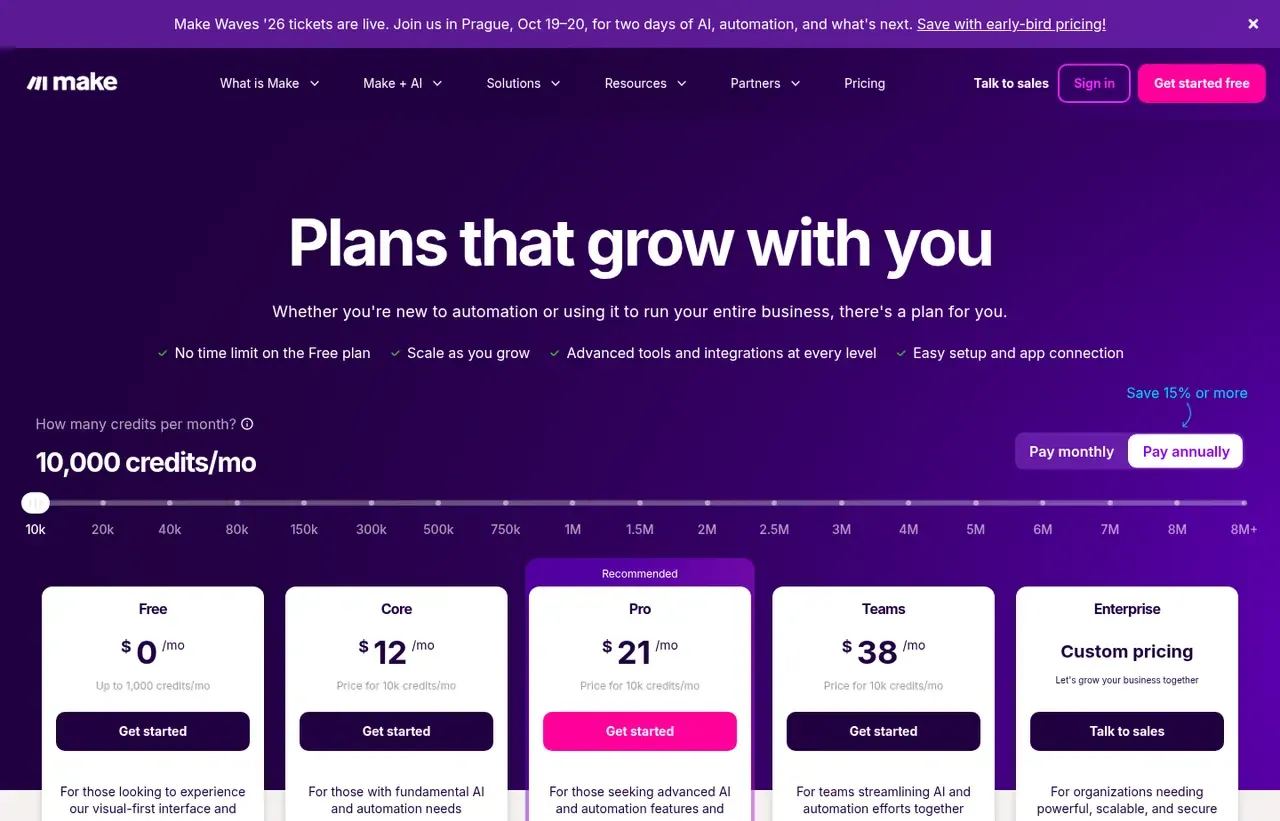
| Core | $9 | per month | Read from the credit slider at 10,000 credits/month, billed annually. Unlimited active scenarios |
| Pro | $16 | per month | Read from the credit slider at 10,000 credits/month, billed annually. Priority execution, custom variables |
| Teams | $29 | per month | Read from the credit slider at 10,000 credits/month, billed annually. Team roles and shared templates |
| Enterprise | Custom pricing | Negotiated | On-prem agent, overage protection, 24/7 support, advanced security |
What Make actually costs over a year
A monthly price is not the same thing as a monthly contract. These are the plans above resolved both ways, per seat or unit where the plan is charged that way. Where a vendor quotes only a yearly figure it is divided by twelve rather than left out, and the Quoted column says which figure the vendor actually publishes.
| Plan | Quoted | Monthly | Over 12 months |
|---|---|---|---|
| Core | per month | $9 | $108 |
| Pro | per month | $16 | $192 |
| Teams | per month | $29 | $348 |
Which Make plan should you buy?
| Your situation | Recommended | Why |
|---|---|---|
| You are learning automation and can wait between runs | Free | 1,000 credits a month, but throttled to a 15-minute minimum interval. That limit, not the credits, is what forces the upgrade. |
| You need scheduling down to the minute | Core | $9 a month at 10,000 credits billed annually, with unlimited active scenarios. |
| You need priority execution and full-text log search | Pro | $16 a month at the same credit tier. |
| Several people build automations together | Teams | $29 a month at the same credit tier, adding roles and shared templates. |
| Your volume is high | Set the credit slider before comparing | Every price is quoted at 10,000 credits and the slider runs past eight million. "Make starts at $9" is nearly meaningless alone. |
| You need one simple two-app automation | Consider Zapier instead | Zapier gets that done in two minutes with a gentler interface. |
Verdict by who you are
Operations person with branching workflowsYes
Routers, iterators and error handlers are first-class here. Once a workflow stops being a straight line, Make is the right tool.
High-volume automation userYes
Credit pricing is materially cheaper than per-task billing at volume.
Non-technical user with simple needsNo
The learning curve is real and Zapier is friendlier for linear automations.
Team needing predictable billingCompare first
Credits are usage-based, so a busy month costs more. Overage protection is Enterprise-only.
Should you buy Make?
Buy Make if…
- Branching workflows with conditions and multiple paths
- High-volume automation where per-task pricing hurts
- People who think visually rather than in sequential steps
Do not buy Make if…
- Simple two-app automations, where Zapier is quicker
- Teams wanting the largest possible app catalogue
- Anyone needing predictable flat-rate billing
Key features
- Visual canvas showing the whole workflow at once
- Routers that split a scenario down multiple conditional paths
- Iterators and aggregators for handling arrays
- Error handlers with retry and rollback routes
- Scheduling down to the minute on paid plans
- Custom variables and full-text execution log search on Pro
- Make API for managing scenarios programmatically
- Roughly 3,000 app integrations
Integrations
- Google Workspace and Microsoft 365
- Slack, Notion and Airtable
- HubSpot and Salesforce
- Stripe and Shopify
- HTTP and webhook modules for anything unlisted
Make screenshots
Captured by us in August 2026 at 1440px, unedited. Interfaces change, so these show the product as it looked on the date we verified this profile. Pricing pages are captured from a US vantage point, so the currency shown matches the USD figures recorded above.
Our assessment
Make is the better tool the moment a workflow stops being a straight line. Routers, iterators and error handlers are first-class rather than bolted on, and seeing the entire scenario laid out makes complex automation genuinely maintainable. Credits are also kinder than per-task pricing at volume. The costs are a steeper learning curve than Zapier and a pricing model that needs reading twice: the headline $9 is the Core plan at the smallest credit tier with annual billing, and the same plan scales up the slider to millions of credits a month. Work out your credit consumption before comparing anything, because every published figure is anchored to a tier you may not be on.
What works in Make
- Visual canvas makes branching workflows comprehensible
- Credit pricing is cheaper than per-task billing at volume
- Proper error handling with retries and rollback paths
- Usable free tier with 1,000 credits a month and no time limit
What doesn't
- Steeper learning curve than Zapier for simple jobs
- Headline prices are anchored to the smallest credit tier
- Free plan is throttled to a 15-minute minimum run interval
- Smaller app catalogue than Zapier
EveryAny Decision Score
3 of these 8 dimensions are calculated from verified facts; the rest are our judgement, shown as a band rather than a figure unless something specific sits behind them. How each score works.
- Cost position5.4/10
derivedentry tier at $9 a month against a category median of $9.99 a month across 28 comparable tools
- Portability5/10
derivedpublic API
- Subscription flexibility6/10
derivedfree plan, usage based, monthly billing
- Feature depthVery high
editorialour judgement, with no measurement behind it
- Ease of learningModerate
editorialour judgement, with no measurement behind it
- CollaborationHigh
editorialour judgement, with no measurement behind it
- AI capabilityHigh
editorialour judgement, with no measurement behind it
- Professional adoptionHigh
editorialour judgement, with no measurement behind it
What leaving Make would cost
moderate lock-in
Make scores on public API. Portability 5/10 ; lock-in is the inverse. How this is calculated.
Make competitors and alternatives
| Alternative | Why you might pick it instead |
|---|---|
| Zapier | Larger app catalogue and far easier for simple linear automations. |
| n8n | Self-hostable and source-available, better if you want to own the runtime. |
| Power Automate | The obvious choice if your estate is already Microsoft. |

Zapier
Productivity
The integration layer for software that was never designed to talk.
Checked Aug 2026
Read the credit slider before you read the price
Make’s pricing page has a slider labelled “How many credits per month?” that runs from 10,000 to more than eight million. Every plan price moves with it. The figures quoted everywhere, including here, are the prices at 10,000 credits a month with annual billing: Core $9, Pro $16, Teams $29. Monthly billing costs more, since the page describes annual as saving 15% or more.
So “Make starts at $9” is true and close to meaningless on its own. Estimate your monthly credit consumption first, set the slider to it, and compare the resulting number against Zapier. At low volume the two are similar; at high volume Make usually wins by a wide margin, because Zapier charges per task while Make charges per credit and a credit goes further.
Data transfer scales with the same dial: roughly 5 GB per 10,000 monthly credits.
Routers are the actual product
A Zapier Zap is fundamentally a sequence. A Make scenario is a graph. Routers split execution down several conditional paths, iterators loop over arrays, aggregators collapse results back into one bundle, and error handlers give a failed module somewhere to go other than a dead stop.
If your automation has an “if this, otherwise that, unless the record already exists” shape, this is the difference between a tool that fits and a tool you fight.
The free plan is real but throttled
1,000 credits a month, no time limit, roughly 3,000 apps, routers and filters included. The constraint is a 15-minute minimum interval between runs, so anything needing near-real-time reaction requires Core, where scheduling goes down to the minute. That single limit, not the credit allowance, is what usually forces the upgrade.
Where Zapier is still the right answer
Simple, linear, two-app automations. Zapier has more integrations, a gentler interface and gets a “when a form is submitted, add a row” job done in two minutes. Make rewards the time you invest in learning it, which is only a good trade if your workflows justify it.
Who owns it
Make is part of Celonis, a process-mining company, having been acquired as Integromat in 2020 and renamed in 2022. The product has continued to develop under that ownership rather than stagnating, which is worth saying because acquisition often goes the other way. It does mean the roadmap serves an enterprise process-intelligence strategy, not only the small teams who made Integromat popular.
Make questions, answered
- Is Make worth it?
- Make is the better tool the moment a workflow stops being a straight line.
- How much does Make cost?
- Free with 1,000 credits/month; Core $9/month at 10,000 credits, billed annually. The cheapest paid tier we recorded is Core, published at $9 a month, which works out at $9 a month or $108 over a year. Verified against the vendor's pricing page.
- Does Make have a free plan or free trial?
- Make has a free plan. No free trial is offered.
- What is the best Make alternative?
- It depends on the job. Zapier: Larger app catalogue and far easier for simple linear automations. n8n: Self-hostable and source-available, better if you want to own the runtime. Power Automate: The obvious choice if your estate is already Microsoft.
- Can I self-host Make?
- No. Make is a hosted service only, so your data lives on the vendor's infrastructure.
What this profile is based on
Every claim below is about our work, not about Make. A "no" is recorded rather than omitted, because the difference between a tested review and careful desk research is the reader's to weigh. How we research a profile.
-
Prices read from the vendor : yes
Read from Make's own pricing page on 9 August 2026
-
Plans and terms recorded : yes
5 rows, each with its billing period
-
Original screenshots : yes
1 captured by us: pricing page
-
Sources cited and dated : yes
1 primary source, each with the date it was read
-
Product used first-hand : no
Not tested. This profile is desk research from primary sources
-
Alternatives used first-hand : no
None, so comparisons here rest on published facts rather than use
-
Vendor contacted : no
Not contacted for this profile
One-click Google setting
Get our writing surfaced first on Google
If this was useful, add EveryAny.One as a preferred source in Google. Our profiles and best-of guides will appear ahead of the rest in Top Stories, AI Mode and AI Overviews when you search for software.
- Our reviews get a "preferred" badge in Top Stories and AI Overviews.
- AI Mode leans on the sources you've chosen when it answers.
- Change it back any time from the same Google page.

Opens Google's source preferences in a new tab.
Provenance and freshness
When each fact was last checked
- Pricing ·
- Plans ·
- Free trial
- Features
- Platforms
- Integrations
- Affiliate programme
- Company details
What has changed
-
August 2026
- Pricing verified at the 10,000-credit tier with annual billing
- Added plan picker and verdicts
Sources & verification
Facts on this page were read from the sources below on the dates shown. Where a vendor does not publish a figure, we record it as not disclosed rather than estimating it.
- Make pricing - checked 9 August 2026
Spotted something out of date? Email [email protected] and we will re-check it. Corrections are logged on the page.

