
SaaS buying
How to Read a SaaS Pricing Page (and Find the Real Cost)
The advertised price on a SaaS pricing page is rarely what you pay. Here are the eight places the real cost hides, and the questions that surface it before you sign.
Every SaaS-pricing article I’ve read is a checklist. Look for the free plan, check the annual discount, watch for overages, negotiate on the enterprise tier. Useful tips, all of them, and none of them explain what the pricing page is actually built to do. Once you know that, the checks read as consequence rather than a list of things to remember.
So this one starts with the mechanism, uses the 102 profiles in our own catalogue to check how
often it holds, and ends with a seven-question exercise you can do in front of a live pricing page.
The billing statistics come from scripts/compute-billing-stats.mjs, re-derived on 19 August 2026
against every profile that publishes comparable rates.
The headline price is a marketing number
Almost every SaaS pricing page shows the lowest figure that can be defended as true: annual billing, one seat, the smallest usage band, and any promotional discount folded in. It is not dishonest, but it is not your cost. The real number is assembled from eight places.
The eight places cost hides
1. Monthly versus annual. The displayed price usually assumes prepaying for a year. Paying monthly costs more. Check which figure is on screen before comparing two vendors.
How much more, measured across the products we track
Rather than quote a cross-industry statistic, here is what our own catalogue says. Of the 102 products
we track, 20 publish both a monthly price and an annual-equivalent price for the same plan in a way
that can be compared directly, giving 43 plan pairs. Re-derived on 19 August 2026 by the script at
scripts/compute-billing-stats.mjs:
| Discount for paying annually | |
|---|---|
| Median | 17% |
| Mean | 18.5% |
| Range | 10% to 36.8% |
| Pairs within 15-25% | 27 of 43 |
So the commonly repeated “15 to 25%” is directionally right for about two-thirds of cases, and the tails are wide enough to matter: Box discounts several tiers by 24 to 29%, ClickUp Business by 36.8%, and Asana’s Starter tier by only 18.5%.
Two caveats we would rather state than bury. This counts plans, not revenue, so it is not weighted by how many customers sit on each tier. And it excludes introductory pricing, because that is a different mechanism: WordPress.com’s Personal plan is $4 for the first year against $9 billed monthly, which reads as 56% off for paying annually when the steady-state gap is $8 against $9. Counting promos as billing discounts inflates the number, and plenty of published figures do exactly that.
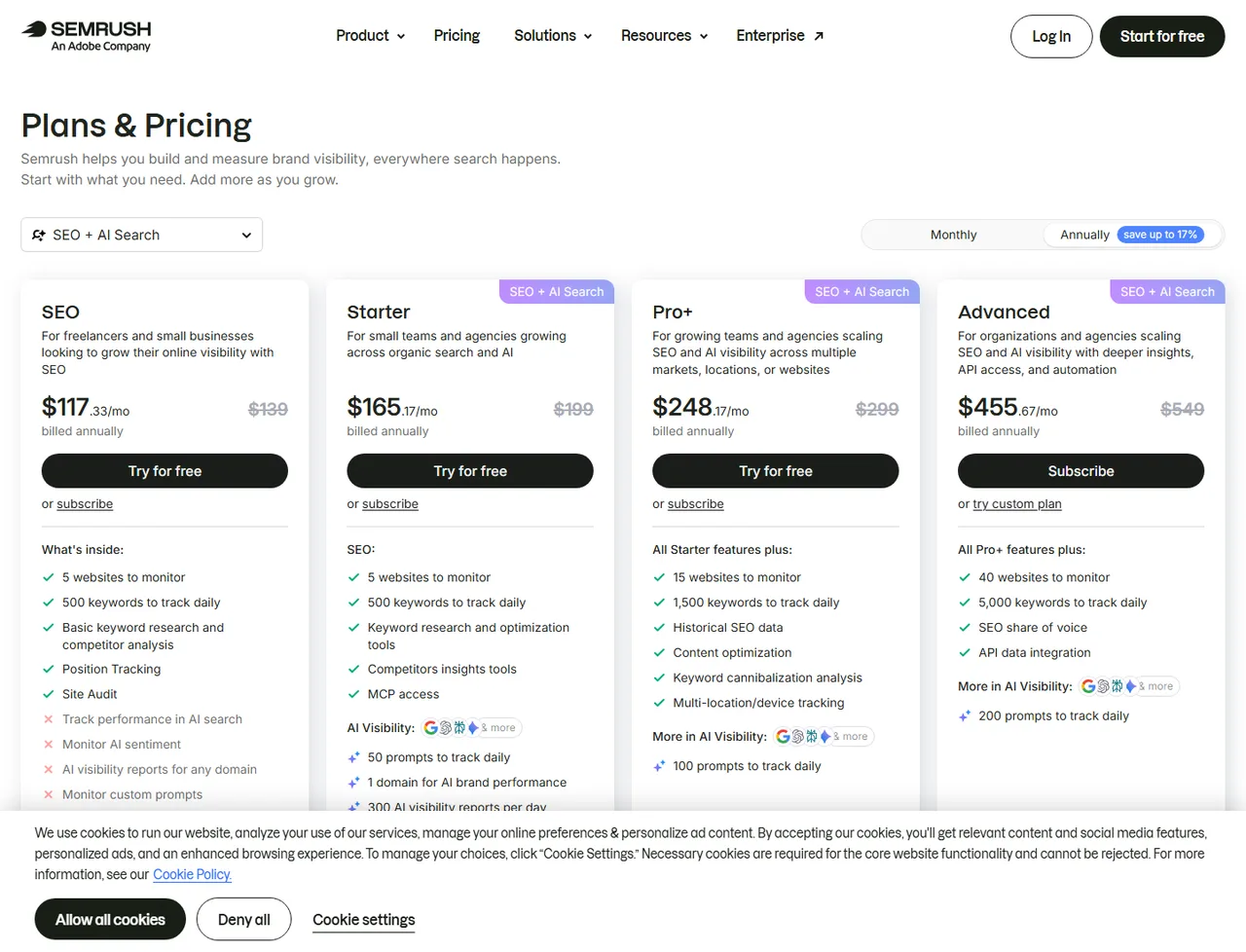
Semrush’s pricing page, read 25 August 2026. The Monthly / Annually toggle at top right and the “save up to 17%” badge - both above the plan cards - are the mechanism §1 names. The $117.33 figure carries “billed annually” underneath it, so the number on the tier card is the annual rate rendered monthly, not the amount a card would be charged if the buyer picked Monthly. The struck-through $139 sitting next to it is a separate marketing frame, and the annual/monthly gap doesn’t need it.
2. The billing unit. Seats, contacts, records, sends, credits, bandwidth, API calls. This decides how your bill grows and is the single most important line on the page. A tool priced on contacts and a tool priced on sends can differ threefold at the same list size.
3. Seat minimums. “From $25 per user” with a five-seat minimum is a $125 product. Common on Team tiers and easy to miss.
4. The tier above. Identify the one feature that will decide whether the tool works - API access, custom reporting, historical data, SSO - and check which tier it is in. It is very often one above the one you were about to buy. Semrush puts API access on its top self-serve tier; HubSpot puts real automation in Professional.
5. Metered overage. Usage-based platforms include an allowance and bill above it. On Vercel that is bandwidth, function invocations and image optimisation - dimensions a traffic spike moves sharply. Set spend alerts on day one.
6. Onboarding and implementation fees. Standard on enterprise tiers, frequently mandatory, and almost never on the pricing page.
7. Per-site or per-project pricing. Framer charges per published site. Twelve client sites means twelve subscriptions. Agencies get caught by this constantly - I’ve watched an agency owner arrive at renewal with a bill four times what he’d budgeted, entirely because the number he’d anchored to was per user and the invoice metered per site.
8. Add-ons priced per seat. AI features are increasingly a separate per-user line item rather than included. Across 40 people that is a second subscription.
A five-minute exercise that beats any comparison table
Open the pricing page and answer these in writing:
- What is the billing unit, and what will it be at three times our current size?
- Which tier contains the one feature the decision depends on?
- What is the monthly price, not the annual-equivalent price?
- What is the seat minimum?
- Which dimensions are metered, and what is the overage rate?
- Is there an onboarding fee?
- What is the notice period, and does it auto-renew?
If a pricing page cannot answer six of the seven, that is itself a finding.
Why we record prices the way we do
On every software profile here we publish the starting price with its billing basis, the plan ladder, whether a free plan exists, the trial length, and the date we checked. Prices change and vendors reprice quietly; a figure without a date attached is not information. Where a vendor does not publish something, we record it as not disclosed rather than estimating - the method is set out in our methodology.
Work out your real cost
Fill in what the pricing page tells you. The result separates first-year cost from renewal, because onboarding fees inflate year one and then disappear, which is how a cheap-looking first year becomes an expensive second one.
Frequently asked questions
Why is the advertised SaaS price lower than what I pay?
Because the headline figure normally assumes annual prepayment, a single seat and the lowest usage band. Monthly billing costs more than the annual-equivalent rate, additional seats are charged individually, and usage above the included allowance is metered separately.
What is the difference between per-seat and usage-based pricing?
Per-seat pricing scales with headcount and is predictable but penalises occasional users. Usage-based pricing scales with consumption - bandwidth, API calls, contacts, records - and is cheaper when quiet but can spike without warning. Which is better depends entirely on whether your headcount or your volume grows faster.
Is annual billing always cheaper for SaaS?
The unit price is lower, typically by a sixth to a quarter. Whether it is cheaper depends on whether you keep the tool for the full year - annual contracts are rarely refundable, so prepaying for a tool you abandon in month four costs more than monthly would have.
What does "contact us for pricing" usually mean?
That the price is set by negotiation and is high enough that publishing it would lose deals. Expect an annual contract, a per-seat or platform fee, and often a one-off onboarding charge. It also means comparable customers pay different amounts, so ask what a company of your size pays.
Should I negotiate SaaS pricing?
On anything with a sales conversation, yes - discounts of 10–25% are routine for annual commitment, and end-of-quarter timing helps. On self-serve plans under about $100/month there is normally no discretion, so do not spend the effort.
One-click Google setting
Get our writing surfaced first on Google
If this was useful, add EveryAny.One as a preferred source in Google. Our profiles and best-of guides will appear ahead of the rest in Top Stories, AI Mode and AI Overviews when you search for software.
- Our reviews get a "preferred" badge in Top Stories and AI Overviews.
- AI Mode leans on the sources you've chosen when it answers.
- Change it back any time from the same Google page.

Opens Google's source preferences in a new tab.
Sources & verification
Facts on this page were read from the sources below on the dates shown. Where a vendor does not publish a figure, we record it as not disclosed rather than estimating it.
- Vercel pricing and limits documentation - checked 1 August 2026
- HubSpot pricing page - checked 9 August 2026
- Semrush pricing - checked 9 August 2026
- Framer pricing - checked 9 August 2026
- EveryAny.One billing dataset, computed from the 102 profiles we track - checked 9 August 2026
Spotted something out of date? Email [email protected] and we will re-check it. Corrections are logged on the page.


