Basecamp Pricing
- Productivity pricing
- $15/mo at the smallest
- Free plan
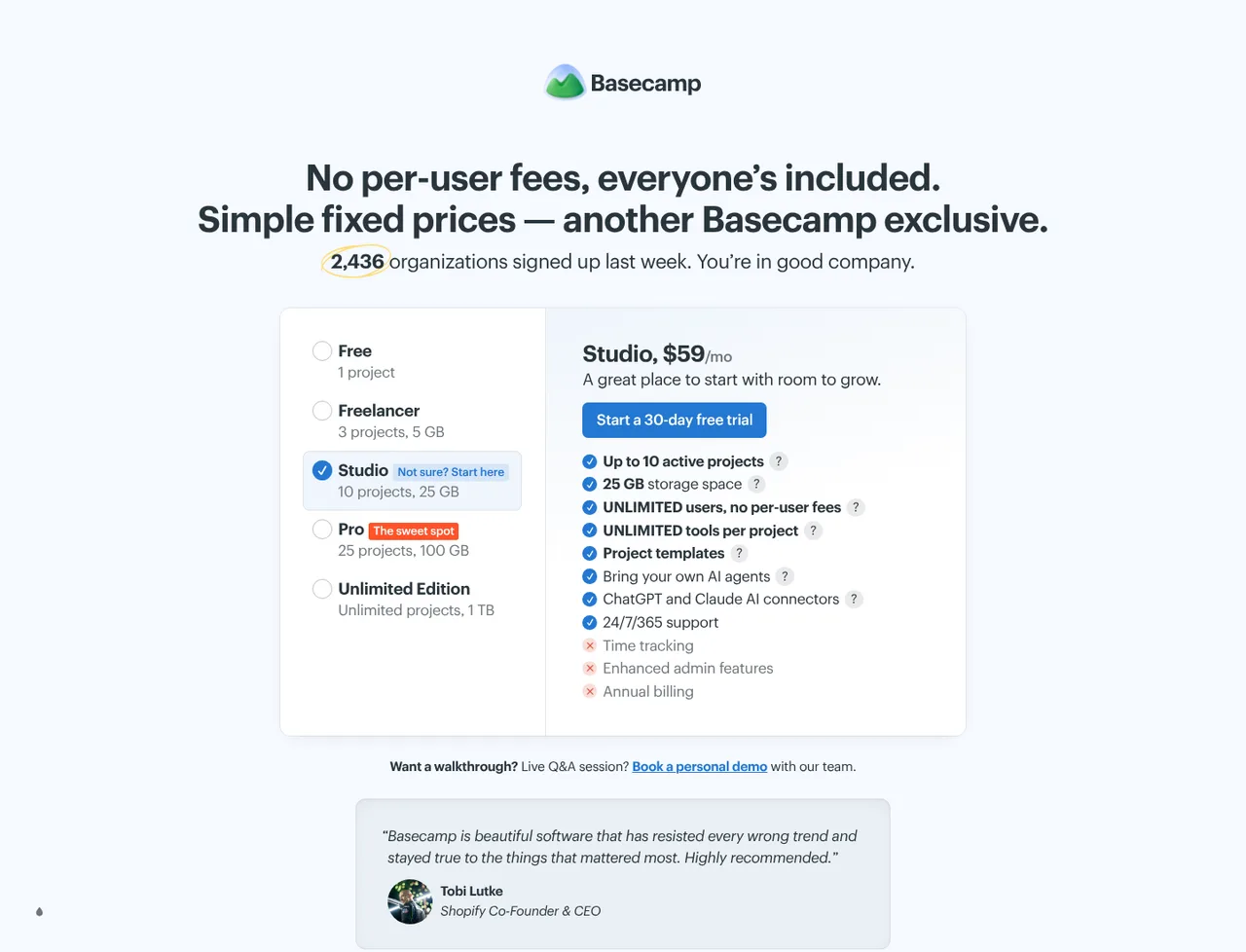
Basecamp pricing starts at $15 a month, which is $180 over twelve months. There is a free plan, and a trial on the paid tiers: 30 days on Pro, 60 days on Pro Unlimited, no credit card required. Every figure below was read from the vendor's pricing page on 19 August 2026, and 2 charges that the headline price does not include are set out below.
Opens the vendor's own pricing page. Figures here were read from it on 19 August 2026.
Basecamp ranking and coverage
- In Productivity
- #19 of 28 tied
- Overall
- #83 of 122 tied
- Terms score
- 4.9 /10
- Referenced here
- 2 pages
Cost position 1.8 · Portability 5 · Subscription flexibility 8 - Ranked on published terms only: entry price against category peers, portability and subscription flexibility, equally weighted. This is not a quality score.How the rank is calculated.
Basecamp pricing at a glance
| Entry price | Free for 1 project and 20 users; Pro $15 per user/month; Pro Unlimited $299/month flat |
|---|---|
| Smallest invoice | $15 a month, or $180 a year |
| How that is reached | Pro at $15 a month |
| Seat minimum | None on the entry plan |
| Free plan | Yes |
| Free trial | 30 days on Pro, 60 days on Pro Unlimited, no credit card required |
| How it charges | subscription |
| Priced plans published | 6 rows on the vendor's page |
| Affiliate programme | No |
| Prices read from | The vendor's own pricing page |
| Last checked | 19 August 2026 |
Every Basecamp plan and what it costs
Read from the vendor's own pricing page on 19 August 2026. Charged as subscription. Free trial: 30 days on Pro, 60 days on Pro Unlimited, no credit card required.
| Plan | Price | Billing | What it is |
|---|---|---|---|
| Free | $0 | per month | Up to 20 users - One project, 1 GB of storage. Downgrading to it requires deleting all but one project |
| Pro | $15 | per month | per user, billed monthly - Unlimited projects, 500 GB of storage. Clients and contractors are not billed - only employees and full users |
| Pro Unlimited | $299 | per month | Unlimited users - Billed annually. Unlimited users at a fixed price, 5 TB of storage, and the Admin Pro Pack and Timesheet upgrades included |
| Timesheet Add-on | $50 | per month | Flat, whatever the headcount. Included on Pro Unlimited |
| Admin Pro Pack Add-on | $50 | per month | Flat, whatever the headcount. Included on Pro Unlimited |
| Extra 1 TB storage Add-on | $50 | per month | Flat, shared across every user on the account |
What Basecamp costs beyond the advertised price
Each of these is a figure you can check on the vendor's own page. The arithmetic is shown so you can redo it rather than take our word for it.
- Charged on top of a plan$600 a year
Timesheet is charged on top of a plan rather than instead of one: $50 a month, which is $600 a year on top of whichever tier you hold.
Working$50 a month x 12 = $600 a year, added to a tier price rather than replacing it.
Computed from the plan table on Basecamp pricing , read 19 August 2026
- Charged on top of a plan$600 a year
Admin Pro Pack is charged on top of a plan rather than instead of one: $50 a month, which is $600 a year on top of whichever tier you hold.
Working$50 a month x 12 = $600 a year, added to a tier price rather than replacing it.
Computed from the plan table on Basecamp pricing , read 19 August 2026
Fixed mechanics above add $1,200 a year to the advertised price. Usage-dependent charges are listed but not summed, because a figure that depends on how much you use cannot be added to one that does not.
What Basecamp actually costs over a year
A monthly price is not the same thing as a monthly contract. These are the plans above resolved both ways, per seat or unit where the plan is charged that way. Where a vendor quotes only a yearly figure it is divided by twelve rather than left out, and the Quoted column says which figure the vendor actually publishes.
| Plan | Quoted | Monthly | Over 12 months |
|---|---|---|---|
| Proper user, billed monthly | per month | $15 | $180 |
| Pro UnlimitedUnlimited users | per month | $299 | $3,588 |
| Timesheet add-on | per month | $50 | $600 |
| Admin Pro Pack add-on | per month | $50 | $600 |
| Extra 1 TB storage add-on | per month | $50 | $600 |
Basecamp pricing against its competitors
Compared on the smallest invoice each vendor will accept, not on the advertised per-seat rate. Where a product has a seat minimum, the figure below is the minimum times the rate, because that is the cheque you would actually write.
| Product | Cheapest paid entry | Free plan | Against Basecamp |
|---|---|---|---|
| Trello | $5 a month | Yes | −$10 a month (−67%) |
| ClickUp | $7 a month | Yes | −$8 a month (−53%) |
| Basecamp | $15 a month | Yes | This product |
| Asana | $21.98 a month | Yes | +$6.98 a month (+47%) |
Which Basecamp plan should you buy?
| Your situation | Recommended | Why |
|---|---|---|
| You are 20 or more people and already on Basecamp | Pro Unlimited | $299 a month billed annually, unlimited users. The crossover against Pro at $15 a user a month is 20 people, so above that this is the cheaper of the two and gets cheaper with every hire. |
| You are a small team of five | Pro | $15 a user a month billed monthly, so $75 a month. Cheaper per-seat options exist at this size. |
| You want to try it on one real project | Free | One project, 20 users and 1 GB of storage, with every feature included. |
| You are an agency with more clients than staff | Pro | Clients and contractors are not billed, so only employees count towards the per-user price. |
| You need dependencies or resource planning | Consider Smartsheet or ClickUp instead | Basecamp does not do either, and no tier adds them. |
Verdict by who you are
Company of 30 to 200 peopleCompare first
A fixed $299 a month for everybody is predictable and gets cheaper with each hire, but cheaper per-seat options exist at 30 - Trello, Plane and ClickUp all come in under it until 43 people or more.
Agency with clients in the toolYes
Clients and contractors are free, which is unusual and materially cheaper than per-seat rivals.
Team of fiveCompare first
$75 a month for five is above Trello, ClickUp and Plane at the same size; you are paying for the absence of setup work.
Team that needs dependencies or capacity planningNo
Neither exists here, and this is a deliberate scope decision rather than a gap to be filled.
Software team tracking sprintsNo
There is no backlog, no sprint and no release, and Card Tables is not an issue tracker.
Should you buy Basecamp?
Buy Basecamp if…
- Teams above about 20 people who want the bill to stop growing
- Companies who want a tool nobody has to configure
- Agencies working with clients and contractors, who are not billed
Do not buy Basecamp if…
- Teams who need dependencies, resourcing or portfolio reporting
- Software teams tracking sprints and releases
- Anyone wanting AI features, which this product does not advertise
Best Basecamp alternative for each job
Chosen by what you are trying to do rather than by which product is closest overall, because the right replacement depends on the job.
| If you mainly need to… | Use | Why |
|---|---|---|
| Cheapest way to give five people a tracker | Plane | Free to 12 users, then $6 a seat a month, and open source. |
| Simplest board a team will actually update | Trello | $5 a user a month, free for ten collaborators, and nothing to configure. |
| Dependencies and resource planning | Smartsheet | Portfolio and resourcing over a grid, with unlimited free contributors. |
| Recurring processes with forms and approvals | Asana | Intake forms, rules and approvals that block, which Basecamp does not attempt. |
What leaving Basecamp would cost
moderate lock-in
Basecamp scores on public API. Portability 5/10 ; lock-in is the inverse. How this is calculated.
The flat fee is the product
Every other tool we price in productivity charges by the person, so the bill tracks headcount. Basecamp offers that too - Pro at $15 a user a month - but its argument is the other package:
| Team size | Pro at $15 a user | Pro Unlimited flat | Cheaper |
|---|---|---|---|
| 5 people | $900 a year | $3,588 a year | Pro |
| 20 people | $3,600 a year | $3,588 a year | Level |
| 50 people | $9,000 a year | $3,588 a year | Pro Unlimited |
| 200 people | $36,000 a year | $3,588 a year | Pro Unlimited |
The crossover against Basecamp’s own Pro plan is 20 people.
Against other vendors it depends entirely on their per-seat rate, and the answer is later than the flat fee makes it feel. $3,588 a year buys unlimited users, so Pro Unlimited is the cheaper option from the headcount where a rival’s annual per-seat bill passes that figure:
| Instead of | Per user a year | Pro Unlimited wins from |
|---|---|---|
| Wrike Business at $25 a user a month | $300 | 12 people |
| Smartsheet Business at $19 | $228 | 16 people |
| Basecamp Pro at $15 | $180 | 20 people |
| Asana Starter at $10.99 | $131.88 | 28 people |
| Teamwork.com Basics at $9.99 | $119.88 | 30 people |
| monday.com Basic at $9 | $108 | 34 people |
| ClickUp Unlimited at $7 | $84 | 43 people |
| Plane Pro at $6 | $72 | 50 people |
| Trello Standard at $5 | $60 | 60 people |
So “flat fee beats per-seat” is true, and true later than it sounds. A 30-person company pays less on Trello, Plane or ClickUp than on Basecamp.
The per-seat rates above are the vendors’ own. The annual figures and the crossover headcounts are arithmetic on them.
Clients and contractors are not billed
The FAQ is explicit: on Pro, “we only bill you $15/user/month for employees or full users, not clients or temporary contractors.” For an agency whose Basecamp holds twelve clients and four staff, that is the difference between paying for four people and paying for sixteen.
What it will not do, at any price
- No dependencies. Nothing records that one task blocks another.
- No resource or capacity planning. No view of who is over-allocated next month.
- No portfolio reporting. Reports and automatic check-ins are the ceiling.
- No sprints, backlogs or releases. Card Tables is a Kanban board, not an issue tracker.
These are scope decisions rather than gaps, and no upgrade adds them. A team that needs the first two should read Smartsheet; a team tracking software delivery wants Jira or Linear.
No AI, stated plainly
Every other product in our comparison names AI on its pricing page - credits, agents, assistants, or a per-seat add-on. Basecamp’s pricing page names none. Whether that is a feature or an omission depends on whether you were going to use them; what it is not is a hidden cost.
The company is part of the pitch
37signals publishes things most vendors do not: 27 profitable years, zero debt, privately held, 99.99% historical uptime, and cancellation that is entirely self-serve with annual payments prorated back to the card. Non-profits get 10% off, and schools and universities are free for class work.
We have not used Basecamp, and this profile makes no claim about how it feels to run a project in. What is checked here is the price list, and the price list is the reason to look.
Basecamp questions, answered
- Is Basecamp worth it?
- Basecamp is the one product in this category that has decided what it is not going to do, and prices accordingly.
- How much does Basecamp cost?
- Free for 1 project and 20 users; Pro $15 per user/month; Pro Unlimited $299/month flat. The cheapest paid tier we recorded is Pro, published at $15 a month, which works out at $15 a month or $180 over a year. Verified against the vendor's pricing page.
- Does Basecamp have a free plan or free trial?
- Basecamp has a free plan. A free trial is available: 30 days on Pro, 60 days on Pro Unlimited, no credit card required.
- What is the best Basecamp alternative?
- It depends on the job. Trello: Cheaper below 20 people at $5 a user, and simpler again. No flat-fee option. ClickUp: Far more capability for $7 a user, and far more configuration to do. Asana: Better at recurring processes with forms, rules and approvals. Priced per seat throughout.
- Can I self-host Basecamp?
- No. Basecamp is a hosted service only, so your data lives on the vendor's infrastructure.
Opens the vendor's own pricing page. Figures here were read from it on 19 August 2026.
What this profile is based on
Every claim below is about our work, not about Basecamp. A "no" is recorded rather than omitted, because the difference between a tested review and careful desk research is the reader's to weigh. How we research a profile.
-
Prices read from the vendor : yes
Read from Basecamp's own pricing page on 19 August 2026
-
Plans and terms recorded : yes
6 rows, each with its billing period
-
Original screenshots : yes
1 captured by us: pricing page
-
Sources cited and dated : yes
2 primary sources, each with the date it was read
-
Product used first-hand : no
Not tested. This profile is desk research from primary sources
-
Alternatives used first-hand : no
None, so comparisons here rest on published facts rather than use
-
Vendor contacted : no
Not contacted for this profile
Desk research from Basecamp's own pricing and about pages, read on 19 August 2026 through a United States egress. Nobody here has used Basecamp, no account was created, and the crossover figure in this profile is arithmetic on the vendor's two published prices rather than a quote from them.
Where Basecamp appears on this site
2 other pages here reference Basecamp. Every one is listed below, so the figure can be checked rather than taken.
- Another profile Plane picks it for unlimited users on a flat fee
- Another profile Teamwork.com picks it for unlimited users on a flat fee, clients free
Counts pages on this site that name the product by choice - price guides, pricing question pages, deal records and other profiles. Category and directory indexes list everything automatically and are not counted.
One-click Google setting
Get our writing surfaced first on Google
If this was useful, add EveryAny.One as a preferred source in Google. Our pricing pages and price guides will appear ahead of the rest in Top Stories, AI Mode and AI Overviews when you search for what software costs.
- Our reviews get a "preferred" badge in Top Stories and AI Overviews.
- AI Mode leans on the sources you've chosen when it answers.
- Change it back any time from the same Google page.

Opens Google's source preferences in a new tab.
Provenance and freshness
When each fact was last checked
- Pricing ·
- Plans ·
- Free trial
- Features
- Platforms
- Integrations
- Affiliate programme
- Company details
Individually sourced claims
-
Pro Unlimited is $299 a month billed annually for an unlimited number of users
Basecamp pricing ↗ · checked
-
Pro is $15 per user a month billed monthly, and clients and contractors are not billed
Basecamp pricing ↗ · checked
-
The free package covers one project, 1 GB of storage and up to 20 users
Basecamp pricing ↗ · checked
-
Timesheet, the Admin Pro Pack and an extra 1 TB of storage are each $50 a month flat, and all are included on Pro Unlimited
Basecamp pricing ↗ · checked
-
Registered 501(c)(3) non-profits get 10% off, and K-12 schools, homeschoolers and universities are free for class work
Basecamp pricing FAQ ↗ · checked
What has changed
-
August 2026
- First published, with every package and add-on read from the vendor's pricing page
- Recorded that clients and contractors are not billed on Pro
- Recorded the 20-user crossover between Pro and Pro Unlimited
Sources & verification
Facts on this page were read from the sources below on the dates shown. Where a vendor does not publish a figure, we record it as not disclosed rather than estimating it.
- Basecamp pricing - checked 19 August 2026
- Basecamp - where we came from - checked 19 August 2026
Spotted something out of date? Email [email protected] and we will re-check it. Corrections are logged on the page.


