
Wrike
Work management from $10 a user, sold in blocks of five seats and annual-only above Team.
- Productivity
- Marketing
- from $10/mo
Wrike is an enterprise work-management platform with a free tier, Team at $10 a user a month and Business at $25, both billed annually. Two purchasing rules matter more than the headline: seats are sold in blocks of five, and Team is capped at 15 users, so a growing team meets a 2.5x price step rather than a gradual one.
Wrike: the short answer
Every line below is drawn from facts verified on 19 August 2026.
- What it is
- Work management from $10 a user, sold in blocks of five seats and annual-only above Team
- Best for
- Marketing and professional-services teams that need proofing and request intake
- Starts at
- Free tier; Team $10 per user/month and Business $25, both billed annually
- Free option
- Free plan available, 14 days, no credit card required trial
- Biggest strength
- Genuine resource and capacity planning from the Business plan
- Biggest drawback
- Seats are sold in blocks of five below 30 seats, so small teams pay for absent people
- Based on
- Primary-source research, not hands-on use
- Closest alternative
- Asana - Similar shape at $10.99 a user, no seat blocks, and seats sold singly up to five users
- True annual cost
- from $600 a year on Team - $10 a seat a month, minimum 5 seats
Wrike at a glance
| Best for | Marketing and professional-services teams that need proofing and request intake, Organisations that need resource and capacity planning, Teams of 5 to 15 who will use the annual commitment anyway |
|---|---|
| Category | Productivity, Marketing |
| Starting price | Free tier; Team $10 per user/month and Business $25, both billed annually |
| Free plan | Yes |
| Free trial | 14 days, no credit card required |
| Pricing model | subscription |
| Company | Wrike |
| Founded | 2006 |
| Headquarters | San Diego, United States (Americas headquarters) |
| Founders | Not disclosed |
| Platforms | Web, macOS, Windows, iOS, Android |
| Public API | Yes |
| Browser extension | Yes |
| Mobile apps | iOS + Android |
| Self-hosting | No |
| Affiliate programme | No |
| Data source | Vendor pricing page and public records |
| Last checked | August 2026 |
Wrike pricing
Prices below were read from the vendor's own pricing page on 19 August 2026. Pricing model: subscription. Free trial: 14 days, no credit card required.
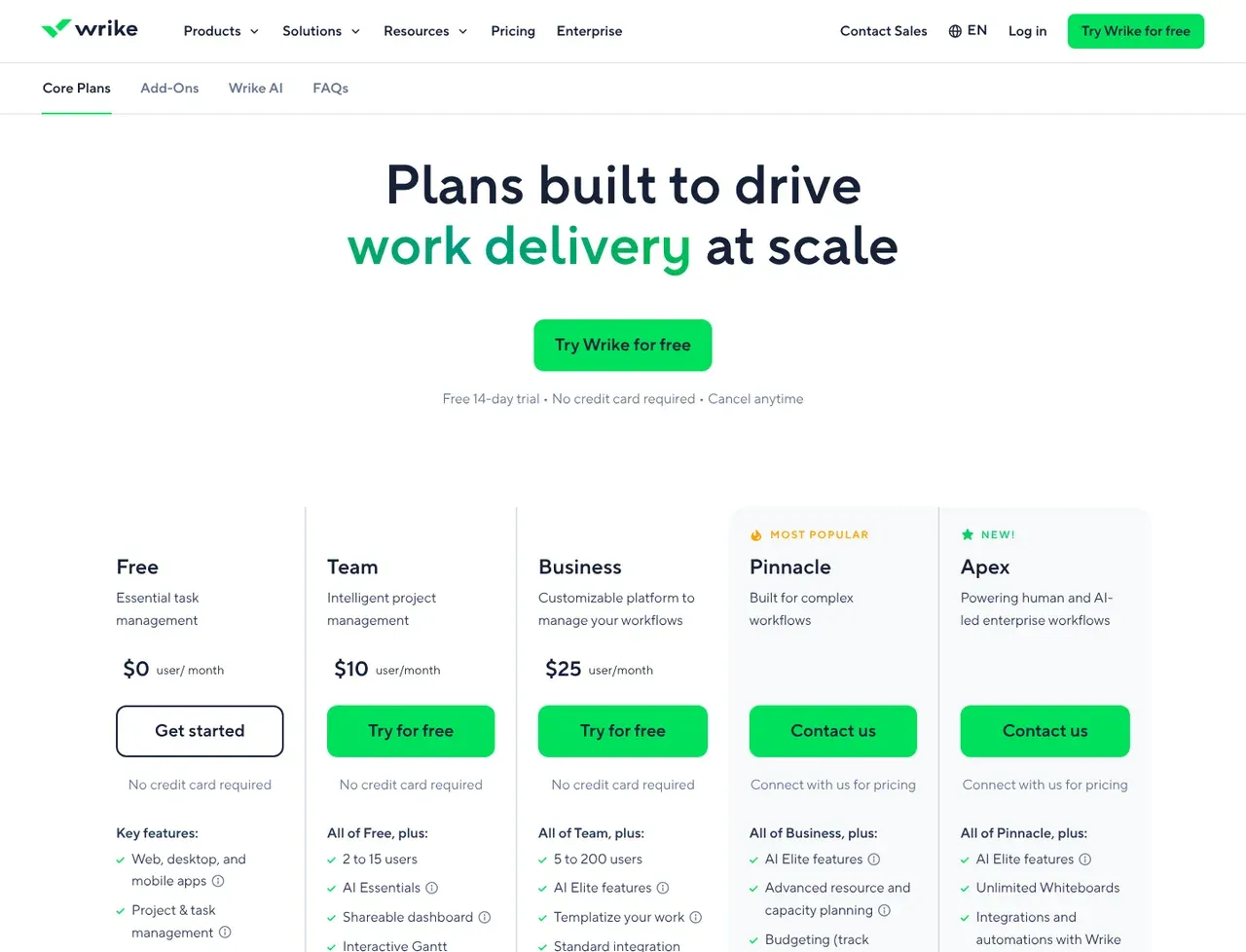
| Plan | Price | Billing | Notes |
|---|---|---|---|
| Free | $0 | per month | per user - Project and task management with board and table views. The page states that active task limitations apply, without publishing the number |
| Team | $10 | per month | 2 to 15 users - Billed on an annual per-user basis. The plan card says 2 to 15 users while the FAQ says subscriptions up to 30 seats are sold in groups of five, so the smallest purchase is five seats. Adds AI Essentials, a shareable dashboard, interactive Gantt charts, custom fields and workflows |
| Business | $25 | per month | 5 to 200 users - Billed annually only. Adds AI Elite features, templates, resource and capacity planning and standard integrations |
| Pinnacle | Contact us | Negotiated | Advanced resource and capacity planning, budgeting, advanced reporting and BI, SSO, Wrike Datahub with 10K records |
| Apex | Contact us | Negotiated | Unlimited whiteboards, Wrike Integrate and Sync, Datahub with 30M records |
| Wrike Whiteboard | $15 | per month | per user - Visual canvas for brainstorming. Included with Apex, a paid add-on on other plans |
| Wrike Integrate, Two-Way Sync, Datahub and Lock | Custom pricing | Negotiated | Each listed as an add-on with no published figure |
What Wrike actually costs over a year
A monthly price is not the same thing as a monthly contract. These are the plans above resolved both ways, per seat or unit where the plan is charged that way. Where a vendor quotes only a yearly figure it is divided by twelve rather than left out, and the Quoted column says which figure the vendor actually publishes.
| Plan | Quoted | Monthly | Over 12 months |
|---|---|---|---|
| Team2 to 15 users | per month | $10 | $120 |
| Business5 to 200 users | per month | $25 | $300 |
| Wrike Whiteboard add-onper user | per month | $15 | $180 |
Which Wrike plan should you buy?
| Your situation | Recommended | Why |
|---|---|---|
| You are a team of 5 to 15 | Team | $10 a user a month billed annually, which is the sweet spot: one full five-seat block and inside the 15-user cap. |
| You are two, three or four people | Team, but budget for five seats | Seats are sold in groups of five below 30, so the smallest Team invoice is five seats. |
| You need resource and capacity planning | Business | $25 a user a month, annual billing only, and the first tier where planning and templates appear. |
| You are about to pass 15 users | Price Business before you hire | Team stops at 15, so the sixteenth person moves the whole account to $25 a user. At 20 seats that is $6,000 a year. |
| You need SSO, budgeting or BI reporting | Pinnacle | No published price. It is a sales conversation, so start it early. |
| You want monthly billing | Team only | The page states Business plans and above are available as annual subscriptions only. |
Verdict by who you are
Marketing team of tenYes
$10 a user with proofing, request forms and dashboards is competitive, and ten seats is exactly two blocks.
Professional-services firm needing capacity planningCompare first
Business at $25 a user delivers it, annual-only, at 2.5x the Team price.
Team of threeNo
You buy five seats and pay for two people who do not exist.
Team of 20No
Team's 15-user cap forces Business, and $6,000 a year is the highest 20-seat figure in our comparison.
Enterprise with an IT functionCompare first
Pinnacle and Apex hold the SSO, budgeting and BI, and neither publishes a price.
Should you buy Wrike?
Buy Wrike if…
- Marketing and professional-services teams that need proofing and request intake
- Organisations that need resource and capacity planning
- Teams of 5 to 15 who will use the annual commitment anyway
Do not buy Wrike if…
- Teams of one, two, three or four, who pay for five seats
- Anyone who needs monthly billing above the Team plan
- Small teams growing past 15 people, where the price per seat multiplies by 2.5
Best Wrike alternative for each job
Chosen by what you are trying to do rather than by which product is closest overall, because the right replacement depends on the job.
| If you mainly need to… | Use | Why |
|---|---|---|
| Same shape without seat blocks | Asana | $10.99 a user, and seats are added one at a time between two and five users. |
| Wide participation at no cost | Smartsheet | Only licensed members pay; contributors who update rows are free. |
| Cheapest capable tracker at 20 seats | Trello | $5 a user a month, so $1,200 a year against Wrike Business at $6,000. |
| Own the tool outright | Plane | Open source under AGPL-3.0, self-hostable, and free to 12 users on the cloud. |
Key features
- Project and task management with board, table and Gantt views
- Custom fields, workflows and request forms
- Resource and capacity planning from the Business plan
- AI Essentials on Team and AI Elite from Business
- Cross-tagging, so one task can sit in several projects
- Proofing and approvals for creative work
- Dashboards and reporting, with BI on Pinnacle
- Customer-managed encryption keys through the Wrike Lock add-on
Integrations
- Wrike API
- Two-way sync with 22 systems including Jira and GitHub, as a paid add-on
- Wrike Integrate for no-code automation, as a paid add-on
- Browser extension and email-in
Wrike screenshots
Captured by us in August 2026 at 1440px, unedited. Interfaces change, so these show the product as it looked on the date we verified this profile. Pricing pages are captured from a US vantage point, so the currency shown matches the USD figures recorded above.
Our assessment
Wrike is a capable enterprise work-management platform whose published pricing is unusually honest about the two things that decide what you actually pay, and both work against small teams. Seats are sold in blocks: up to 30 seats, in groups of five, so a four-person team buys five and a six-person team buys ten. And Team is capped at 15 users, so the moment a team of 15 hires a sixteenth person the only route up is Business at $25 a user - a 2.5x step applied to everyone, not just the new hire. A 20-person team on Business pays $6,000 a year, which is the most expensive outcome of any product in our project management comparison at that size. Business and above are annual-only, so there is no monthly escape hatch either. What the money buys is real: resource and capacity planning, proofing, request forms and cross-tagging, used by 20,000 organisations per the company's own figure. This is a product to buy at 5 to 15 seats, or at enterprise scale with a negotiated Pinnacle contract - and to price very carefully in between.
What works in Wrike
- Genuine resource and capacity planning from the Business plan
- A free tier that keeps board and table views
- Proofing and approvals suit creative and marketing work
- The seat-block and plan-cap rules are published rather than discovered at checkout
What doesn't
- Seats are sold in blocks of five below 30 seats, so small teams pay for absent people
- Team caps at 15 users and the step up to Business is 2.5x per seat
- Business and above are annual-only, with no monthly option
- Most add-ons carry no published price at all
EveryAny Decision Score
3 of these 8 dimensions are calculated from verified facts; the rest are our judgement, shown as a band rather than a figure unless something specific sits behind them. How each score works.
- Cost position0/10
derivedentry tier at $50 a month ($10 per seat with a 5-seat minimum, so $50 a month at the smallest) against a category median of $9.99 a month across 28 comparable tools
- Portability5/10
derivedpublic API
- Subscription flexibility8/10
derivedfree plan, free trial, subscription, monthly billing
- Feature depth8/10
editorialGantt, custom workflows, request forms, proofing and cross-tagging, with resource and capacity planning from Business and budgeting reserved for Pinnacle.
- Ease of learningModerate
editorialour judgement, with no measurement behind it
- CollaborationHigh
editorialour judgement, with no measurement behind it
- AI capability7/10
editorialAI Essentials is included on Team and AI Elite from Business, with an AI Elite action pack sold separately; no credit allowance is published for either.
- Professional adoption8/10
editorialWrike's about page states 20,000+ organisations, 2M+ users, 1,000+ employees and 215,000+ users in its largest account.
What leaving Wrike would cost
moderate lock-in
Wrike scores on public API. Portability 5/10 ; lock-in is the inverse. How this is calculated.
Wrike competitors and alternatives
| Alternative | Why you might pick it instead |
|---|---|
| Asana | Similar shape at $10.99 a user, no seat blocks, and seats sold singly up to five users. |
| monday.com | Cheaper at $9 a seat with a three-seat minimum, and easier for non-technical teams to adopt. |
| Smartsheet | $9 a member with unlimited free contributors, and the stronger option for programme management. |

Asana
Productivity
Work management for teams that have outgrown a board but not hired a PM.
Checked Aug 2026

monday.com
Productivity
A colourful work OS you configure rather than adopt.
Checked Aug 2026

Smartsheet
Productivity
Enterprise work management for organisations that think in spreadsheets.
Checked Aug 2026
Seats are sold in blocks, and that is the price
Wrike publishes the rule most vendors leave to the checkout page:
Wrike is sold in groups of users. For accounts of up to 30 seats, subscriptions are sold in groups of five.
So the invoice does not follow headcount:
| Your team | Seats you buy | Team plan a year |
|---|---|---|
| 3 people | 5 | $600 |
| 5 people | 5 | $600 |
| 6 people | 10 | $1,200 |
| 12 people | 15 | $1,800 |
A three-person team pays the same as a five-person team, and hiring a sixth person doubles the bill. Five, ten and fifteen are the sizes where nothing is wasted.
The 15-user cap is the expensive part
Team runs from 2 to 15 users. Business starts at 5 and runs to 200, at $25 a user a month. There is nothing in between, so a team of 15 that hires one more person moves everybody from $10 to $25 a user a month.
| Team size | Cheapest Wrike plan | A year |
|---|---|---|
| 15 people | Team at $10 | $1,800 |
| 16 people | Business at $25 | $6,000 (20 seats) |
That is the sharpest single price step in our project management comparison, and it is why this profile scores Wrike poorly at 20 seats while rating the product itself well.
Annual only, above Team
The page states it plainly: “Wrike Business plans and above are only available as annual subscriptions.” If you want to pay monthly, Team is the only plan that allows it. Trello, ClickUp and Basecamp all publish monthly rates at every paid tier.
What is actually worth the money
Resource and capacity planning is the reason organisations buy Wrike rather than a board tool, and it arrives on Business. Proofing and approvals fit creative work better than Trello or Basecamp can. Cross-tagging - one task living in several projects without duplication - is genuinely uncommon.
Above Business, the price list stops. Pinnacle holds SSO, budgeting and BI reporting; Apex holds Wrike Integrate and Sync. Neither publishes a figure, and most add-ons say “custom pricing”, so an enterprise budget here cannot be built from the website.
What we have not done
Nobody here has used Wrike. Everything above is read from the vendor’s own pricing and about pages on 19 August 2026, and the annual totals are arithmetic on their published per-seat rates. The company’s figures - 20,000+ organisations, 2M+ users - are its own and are recorded as such.
Wrike questions, answered
- Is Wrike worth it?
- Wrike is a capable enterprise work-management platform whose published pricing is unusually honest about the two things that decide what you actually pay, and both work against small teams.
- How much does Wrike cost?
- Free tier; Team $10 per user/month and Business $25, both billed annually. The cheapest paid tier we recorded is Team, published at $10 a month, which works out at $10 a month or $120 over a year. Wrike will not sell fewer than 5 seats on it, so the smallest bill is $50 a month, or $600 a year. Verified against the vendor's pricing page.
- Does Wrike have a free plan or free trial?
- Wrike has a free plan. A free trial is available: 14 days, no credit card required.
- What is the best Wrike alternative?
- It depends on the job. Asana: Similar shape at $10.99 a user, no seat blocks, and seats sold singly up to five users. monday.com: Cheaper at $9 a seat with a three-seat minimum, and easier for non-technical teams to adopt. Smartsheet: $9 a member with unlimited free contributors, and the stronger option for programme management.
- Can I self-host Wrike?
- No. Wrike is a hosted service only, so your data lives on the vendor's infrastructure.
What this profile is based on
Every claim below is about our work, not about Wrike. A "no" is recorded rather than omitted, because the difference between a tested review and careful desk research is the reader's to weigh. How we research a profile.
-
Prices read from the vendor : yes
Read from Wrike's own pricing page on 19 August 2026
-
Plans and terms recorded : yes
7 rows, each with its billing period
-
Original screenshots : yes
1 captured by us: pricing page
-
Sources cited and dated : yes
2 primary sources, each with the date it was read
-
Product used first-hand : no
Not tested. This profile is desk research from primary sources
-
Alternatives used first-hand : no
None, so comparisons here rest on published facts rather than use
-
Vendor contacted : no
Not contacted for this profile
Desk research from Wrike's own pricing and about pages, read on 19 August 2026 through a United States egress. Nobody here has used Wrike, no trial was started, and the annual totals in this profile are arithmetic on the vendor's published per-seat rates.
One-click Google setting
Get our writing surfaced first on Google
If this was useful, add EveryAny.One as a preferred source in Google. Our profiles and best-of guides will appear ahead of the rest in Top Stories, AI Mode and AI Overviews when you search for software.
- Our reviews get a "preferred" badge in Top Stories and AI Overviews.
- AI Mode leans on the sources you've chosen when it answers.
- Change it back any time from the same Google page.

Opens Google's source preferences in a new tab.
Provenance and freshness
When each fact was last checked
- Pricing ·
- Plans ·
- Free trial
- Features
- Platforms
- Integrations
- Affiliate programme
- Company details ·
Individually sourced claims
-
Team is $10 per user a month and Business $25, both priced per month and billed annually
Wrike pricing ↗ · checked
-
Team covers 2 to 15 users and Business 5 to 200 users
Wrike pricing ↗ · checked
-
Subscriptions are sold in groups of five for accounts up to 30 seats, groups of 10 from 30 to 100 seats and groups of 25 above 100
Wrike pricing FAQ ↗ · checked
-
Wrike Business plans and above are only available as annual subscriptions
Wrike pricing FAQ ↗ · checked
-
Pinnacle and Apex carry no published price, and the Whiteboard add-on is $15 per user a month
Wrike pricing ↗ · checked
-
The published prices apply only to new purchases made on or after 21 January 2026, per the page's own footnote
Wrike pricing ↗ · checked
-
Wrike was founded in 2006 and states 20,000+ organisations and 2M+ users
About Wrike ↗ · checked
What has changed
-
August 2026
- First published, with plans, seat ranges and add-ons read from the vendor pricing page
- Recorded that seats are sold in blocks of five below 30 seats
- Recorded that Business and above are annual-only
Sources & verification
Facts on this page were read from the sources below on the dates shown. Where a vendor does not publish a figure, we record it as not disclosed rather than estimating it.
- Wrike pricing - checked 19 August 2026
- About Wrike - checked 19 August 2026
Spotted something out of date? Email [email protected] and we will re-check it. Corrections are logged on the page.

